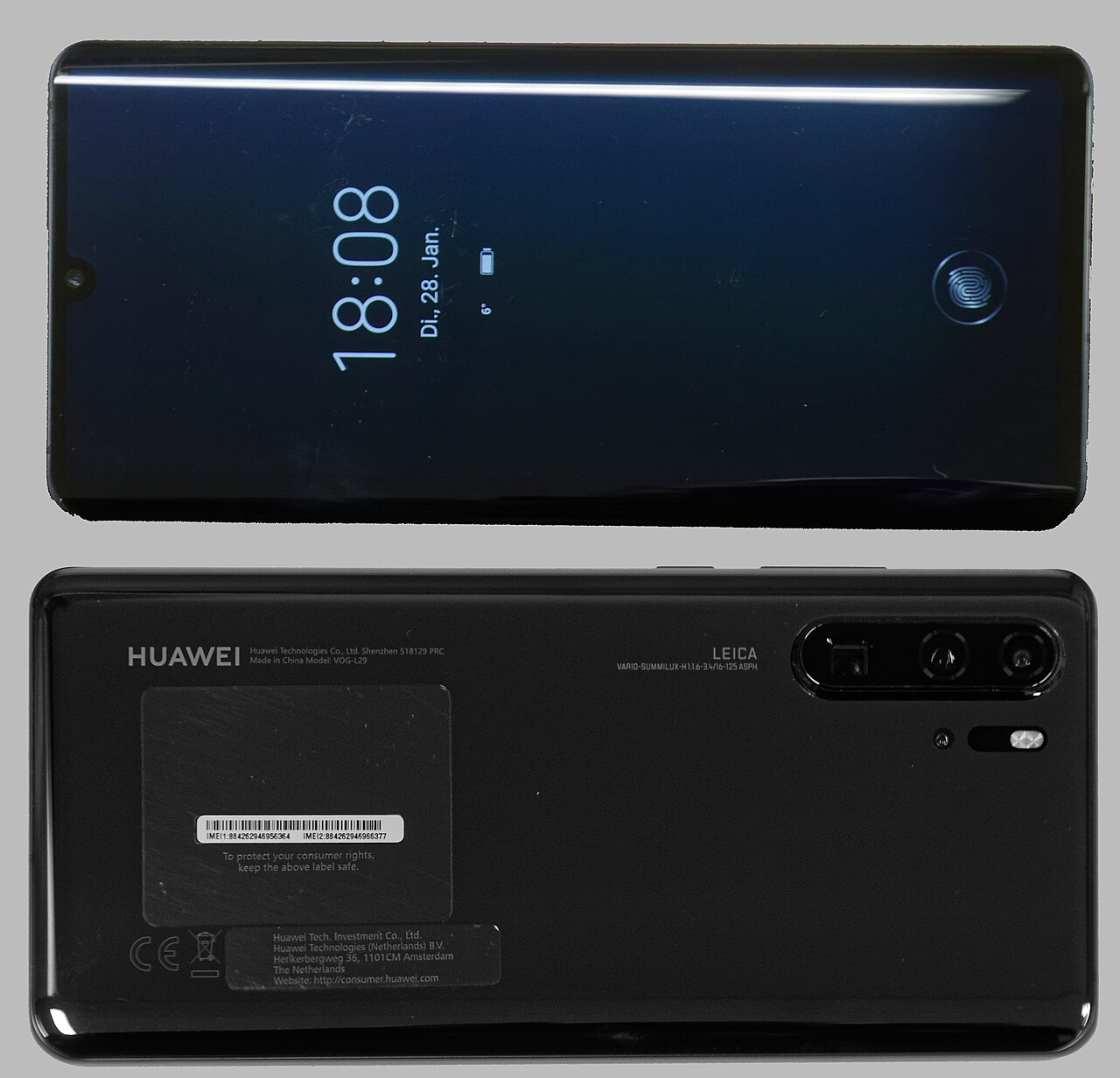

Huawei are announcing more and more interesting phones this year. The Mate 40 and the P50 are certain to catch the eye. Therefore, upgrading your phone could become increasingly likely. So, if you are looking to sell or get a repair, how do you identify which Huawei phone you have?
Perhaps with all the controversy surrounding Huawei in America and Britain you are considering stepping away from the brand and considering a Samsung or Apple device. In either case you would be looking to sell your old phone and get a good price for it. So, you need to identify the exact model of Huawei phone that you have in order to find out how much it’s worth.
Why it’s important to know your Huawei phone model number
Knowing exactly which Huawei phone you have is important for a number of other reasons. Firstly, it allows you to find and purchase accessories that are compatible with your device. This takes the guesswork out of taking a risk and purchasing an incompatible product.
Secondly, some Huawei devices no longer receive support from Google Play Services. Therefore, by knowing which Huawei model you have, you can check to see if it is still supported.
How to identify which Huawei phone model you have
The best way of doing this is finding the model number and consulting our table below.
Huawei Phone Model Name | Huawei Phone Model Number |
Huawei Ascend Mate 7 | MT7-TL00, MT7-L09, MT7-TL10, MT7-CL00, MT7-UL00 |
Huawei P8 Lite | PRA-TL10, PRA-TL20, PRA-LA1, PRA-LX1, PRA-LX2, TAG-L21, PRA-AL00X, TAG-L32, PRA-LX3, PRA-AL00 |
Huawei P9 | EVA-L09, EVA-L19, EVA-L29, EVA-AL10, EVA-TL00, EVA-AL00, EVA-DL00 |
Huawei P9 Lite | VNS-L31, VNS-L21, VNS-L22, VNS-L23, VNS-L53, VNS-AL00, VNS-L62, VNS-L52 |
Huawei P9 Lite Mini | SLA-L02, SLA-L22, SLA-L03, SLA-L23 |
Huawei P9 Plus | VIE-L09, VIE-L29, VIE-AL10 |
Huawei P10 | VTR-L29, VTR-AL00, VTR-TL00, VTR-L09 |
Huawei P10 Lite | WAS-LX1, WAS-LX2, WAS-LX3, WAS-LX1A, WAS-LX2J, WAS-L03T, WAS-AL00, WAS-TL10 |
Huawei P10 Plus | VKY-L29, VKY-L09, VKY-AL00 |
Huawei P20 | EML-L29C, EML-L09C, EML-AL00 EML-TL00, EML-L29, EML-L09, EML-AL00 |
Huawei P20 Lite | NE-TL00, ANE-LX1, ANE-LX2, ANE-LX3, ANE-LX2J, ANE-AL00, ANE-L23, ANE-L22, ANE-L21, HWV32 |
Huawei P20 Pro | CLT-L29C, CLT-L29, CLT-L09C, CLT-L09, CLT-AL00, CLT-AL01, CLT-TL01, CLT-AL00L, CLT-L04, HW-01K |
Huawei P30 | ELE-L29, ELE-L09, ELE-AL00, ELE-TL00, ELE-L04 |
Huawei P30 Lite | MAR-LX1M, MAR-AL00, MAR-TL00, MAR-LX2, MAR-L21A, MAR-L01A, MAR-L21MEA, MAR-L22A, MAR-LX1A, MAR-LX3A, MAR-LX2J, MAR-LX1B |
Huawei P30 Pro | VOG-L29, VOG-L09, VOG-AL00, VOG-TL00, VOG-L04, VOG-AL10 |
Huawei P40 | ANA-AN00, ANA-TN00 |
Huawei P40 Lite | JNY-L21A, JNY-L01A, JNY-L21B, JNY-L22A, JNY-L02A, JNY-L22B, JNY-LX1 |
Huawei P40 Lite E | ART-L28, ART-L29 |
Huawei P40 Pro | ELS-NX9, ELS-N04, ELS-AN00, ELS-TN00 |
Huawei P40 Pro+ | ELS-NX9, ELS-N04 |
Huawei P-Smart Z | STK-LX1 |
Huawei P-Smart 2017 | FIG-LX1, FIG-LA1, FIG-LX2, FIG-LX3, FIG-TL10, FIG-AL10 |
Huawei P-Smart 2019 | POT-LX1, POT-LX1AF, POT-LX2J, POT-LX1RUA, POT-LX3 |
Huawei P-Smart 2019 Plus | POT-LX1T |
Huawei P Smart 2021 | PPA-LX1, PPA-LX2 |
Huawei Mate 10 | ALP-L09, ALP-L29, ALP-AL00 |
Huawei Mate 10 lite | RNE-L21, RNE-L22, RNE-L01, RNE-L02, RNE-L11, RNE-L23, RNE-L03, RNE-AL00 |
Huawei Mate 10 Pro | BLA-L29, BLA-L09, BLA-AL00, BLA-A09 |
Huawei Mate 20 | HMA-L09, HMA-LX9, HMA-L29, HMA-AL00, HMA-TL00 |
Huawei Mate 20 Lite | SNE-AL00, SNE-LX1, SNE-LX2, SNE-LX3, INE-LX2 |
Huawei Mate 20 Pro | LYA-L09, LYA-L29, LYA-AL00, LYA-AL10, LYA-TL00, LYA-L0C |
Huawei Mate 20 X | EVR-L29, EVR-AL00, EVR-TL00 |
Huawei Mate 20 X (5G) | EVR-N29 |
Huawei Mate 30 | TAS-L09, TAS-AL00, TAS-TL00 |
Huawei Mate 30 Pro | LIO-L09, LIO-L29, LIO-AL00, LIO-TL00 |
Huawei Mate 30 5G | TAS-AN00, TAS-TN00 |
Huawei Mate 30 Pro 5G | LIO-N29, LIO-AL10, LIO-TL10 |
Huawei Y7 | DUB-LX1 |
Huawei Y7 2017 | DUB-LX1, DUB-LX3 |
Huawei Y6 | MRD-LX1F, MRD-LX1, MRD-LX3, MRD-LX1N |
Huawei Y6p | MED-LX9, MED-LX9N |
Huawei Y6 2018 | ATU-L11, ATU-LX3, ATU-L21, ATU-L22 |
Huawei Y5 (2019) | AMN-LX9, AMN-LX1, AMN-LX2, AMN-LX3 |
Huawei Y5 (2017) | MYA-L03, MYA-L23, MYA-L02, MYA-L22, MYA-U29, MYA-L13 |
Find the model number on the side of the box
The second way of finding the model number is on the side of the box. There is a label on the side that has useful information such as the IMEI, Serial and Model Number.
Find the Huawei phone model number label on the box.
How to identify which Huawei phone you have in the settings menu
If you have disposed of the box you can go into the settings menu of the phone.
Go to: Settings > About Phone.
This will show you a screen with all of the device’s key information, such as what software it is running and the model number.
How to identify which Huawei phone you have from the about menu in settings.
What if I can’t power-up the phone?
If you are unable to power-up the device, you can check on the back or top plate. On the upper portion of the phone underneath the camera or on the lower portion of the back it will list the model number.
How to identify which Huawei phone you have by the model number on the back case.
By using the model number and consulting the table above, you can quickly identify which Huawei phone you have. If it does not appear then it is likely to be more than five years old. Jump online and quickly google the number to find out which phone you have.
Once you’ve found which Huawei phone you have it is very easy to find the right price to sell or buy it and shop for accessories.
Identify the Huawei phone model number to book a repair
Booking a repair online for your Huawei phone could not be easier. Firstly, simply identify your model. Secondly, choose your repair and checkout. It can all be booked and organised in less then three minutes.
Help Repair My Huawei Phone