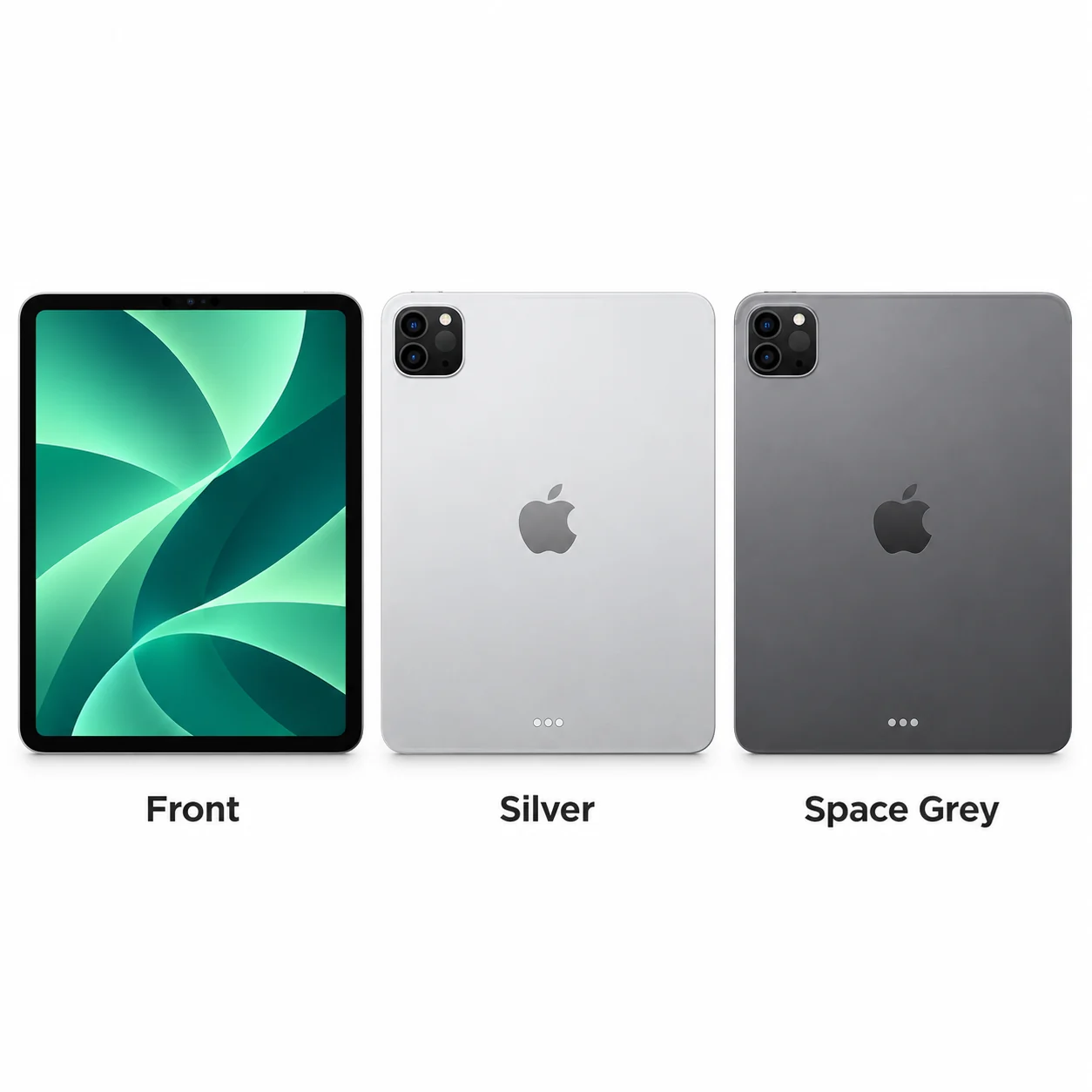
iPad Pro 11-inch (3rd generation) model numbers
A model number identifies the model or hardware version and is shared by many devices. Your serial number identifies your individual device; cellular versions also have an IMEI.
Where to find your model number
- Open Settings, then General, then About.
- At Model Number, tap the displayed part number to reveal the A-number.
- Match the A-number to the Wi-Fi or cellular variant below; Model Name alone does not identify every regional radio version.
If the iPad will not turn on: Check the small model number printed on the back of the iPad. Use good lighting; do not open the device.
All 4 A-numbers listed for iPad Pro 11-inch (3rd generation) in Apple’s identification guide and verified regional technical specifications, checked 20 November 2026. Wi-Fi and cellular variants share this model page; China, radio and other regional distinctions are retained where Apple states them.
Swipe the table sideways on a narrow screen.
| Model number | Version or region | Useful detail |
|---|---|---|
| A2377 | Wi-Fi | A2377 on the iPad Pro |
| A2459 | Wi-Fi + Cellular | A2459 on the iPad Pro Wi-Fi + Cellular; Apple does not assign a complete country-by-country mapping in the identification entry. |
| A2301 | Wi-Fi + Cellular — mmWave variant | A2301 on the iPad Pro Wi-Fi + Cellular with mmWave |
| A2460 | Wi-Fi + Cellular — China mainland | A2460 on the iPad Pro Wi-Fi + Cellular (China mainland only) |
All 2 standard colours
These are the original manufacturer finishes listed for this model, including documented later colours. Availability varied over time and by market.
- Silver
Black front bezel. Colour swatch is approximate; lighting and screen settings affect appearance.
- Space Grey
Black front bezel. Colour swatch is approximate; lighting and screen settings affect appearance.
Use the colour and the model number together. Lighting, screen settings, cases and replacement backs can change how a device looks.
Getting to know the iPad Pro 11-inch (3rd generation)
M1 in the compact 2021 Pro
The third-generation 11-inch Pro brings M1 to a 247.6 × 178.5 mm body. It has a Liquid Retina LCD with ProMotion. The 12.9-inch model from the same year uses a different mini-LED display, so the two screen descriptions are not interchangeable.
Storage and memory are linked
The 128GB, 256GB and 512GB versions have 8GB of memory; the 1TB and 2TB versions have 16GB. When assessing a used unit, check its actual capacity in Settings instead of relying on a seller’s reference to M1 alone.
The front camera and port gain capability
A 12MP Ultra Wide front camera supports Center Stage, and the USB-C connector supports Thunderbolt and USB 4. Apple Pencil (2nd generation) and Apple Pencil (USB-C) are compatible. The rear still has two photographic cameras and LiDAR.
Specifications and what they mean
Read each specification alongside its explanation. Manufacturer test figures describe controlled conditions; age, usage and battery condition affect everyday performance.
Swipe the table sideways on a narrow screen.
| Feature | iPad Pro 11-inch (3rd generation) | What it means |
|---|---|---|
| Screen | 11-inch LCD (Liquid Retina) | The diagonal size describes the screen, not the outside width of the tablet. |
| Resolution | 2388 × 1668 pixels; 264 ppi | Pixel count describes image detail; ppi describes how tightly pixels are packed. |
| Processor | M1 | The chip runs applications and graphics; individual software decides which capabilities it uses. |
| Memory | 8GB on 128/256/512GB models; 16GB on 1/2TB models | Working memory is separate from file storage. Some Pro configurations vary with capacity. |
| Storage | 128GB, 256GB, 512GB, 1TB and 2TB | Apple-listed capacity options across this model’s life; usable space is lower after software and formatting. |
| Body size | 247.6 × 178.5 × 5.9 mm | Height × width × depth before adding a case. |
| Weight | 466 g Wi-Fi; 470 g cellular | The radio hardware can change weight; these are Apple’s listed device weights. |
| Rear camera | 12MP Wide and 10MP Ultra Wide; LiDAR scanner | LiDAR measures depth rather than taking a separate colour photograph. |
| Front camera | 12MP Ultra Wide TrueDepth; Center Stage | Center Stage reframes compatible video calls. |
| Charging and wired connection | USB-C; Thunderbolt / USB 4 up to 40Gb/s | Use a compatible cable and power adapter. Data speed depends on the cable, accessory and connection mode. |
| Apple Pencil | Apple Pencil (2nd generation) and Apple Pencil (USB-C) | Pencil models are not interchangeable; a compatible software version may be required. |
| Authentication | Face ID | Face ID uses facial recognition; Touch ID reads a fingerprint. |
| Wireless connections | Wi-Fi 6; Bluetooth 5.0 | Wi-Fi needs a suitable network; Bluetooth connects compatible accessories. |
| Mobile data | 5G/LTE on cellular models | Wi-Fi-only hardware has no cellular modem. Coverage, plan, network support and regional bands all matter. |
| Apple battery test | Up to 10 hours of web browsing on Wi-Fi or video | A manufacturer test claim for a new battery; real runtime depends on usage, settings, age and condition. |
| Current major software compatibility | Listed for iPadOS 27 | Checked on 20 November 2026; feature availability is separate from basic operating-system compatibility. |
Software and security updates
Apple lists iPad Pro 11-inch (3rd generation) as compatible with iPadOS 27, checked on 20 November 2026. Features depend on the model, region, language and app. This does not promise a future support end date.
Common questions about the iPad Pro 11-inch (3rd generation)
Which Apple Pencil works with iPad Pro 11-inch (3rd generation)?
iPad Pro 11-inch (3rd generation) works with Apple Pencil (2nd generation) and Apple Pencil (USB-C). Choose the exact Pencil version and check the software requirements before buying.
Which charging connector does iPad Pro 11-inch (3rd generation) use?
iPad Pro 11-inch (3rd generation) has a USB-C connector. Choose a cable with that connector at the iPad end and a power-adapter connection that matches your charger.
Does iPad Pro 11-inch (3rd generation) have Face ID or Touch ID?
iPad Pro 11-inch (3rd generation) uses Face ID and has no Home button. Its facial-recognition hardware is part of the front TrueDepth camera system.
Can iPad Pro 11-inch (3rd generation) run iPadOS 27?
Apple lists iPad Pro 11-inch (3rd generation) as compatible with iPadOS 27, checked on 20 November 2026. Features depend on the model, region, language and app. This does not promise a future support end date.
About this guide
Manufacturer information checked 20 November 2026. Regional features, software availability and colours can vary. Pictures are visual guides; colours and small details are approximate.