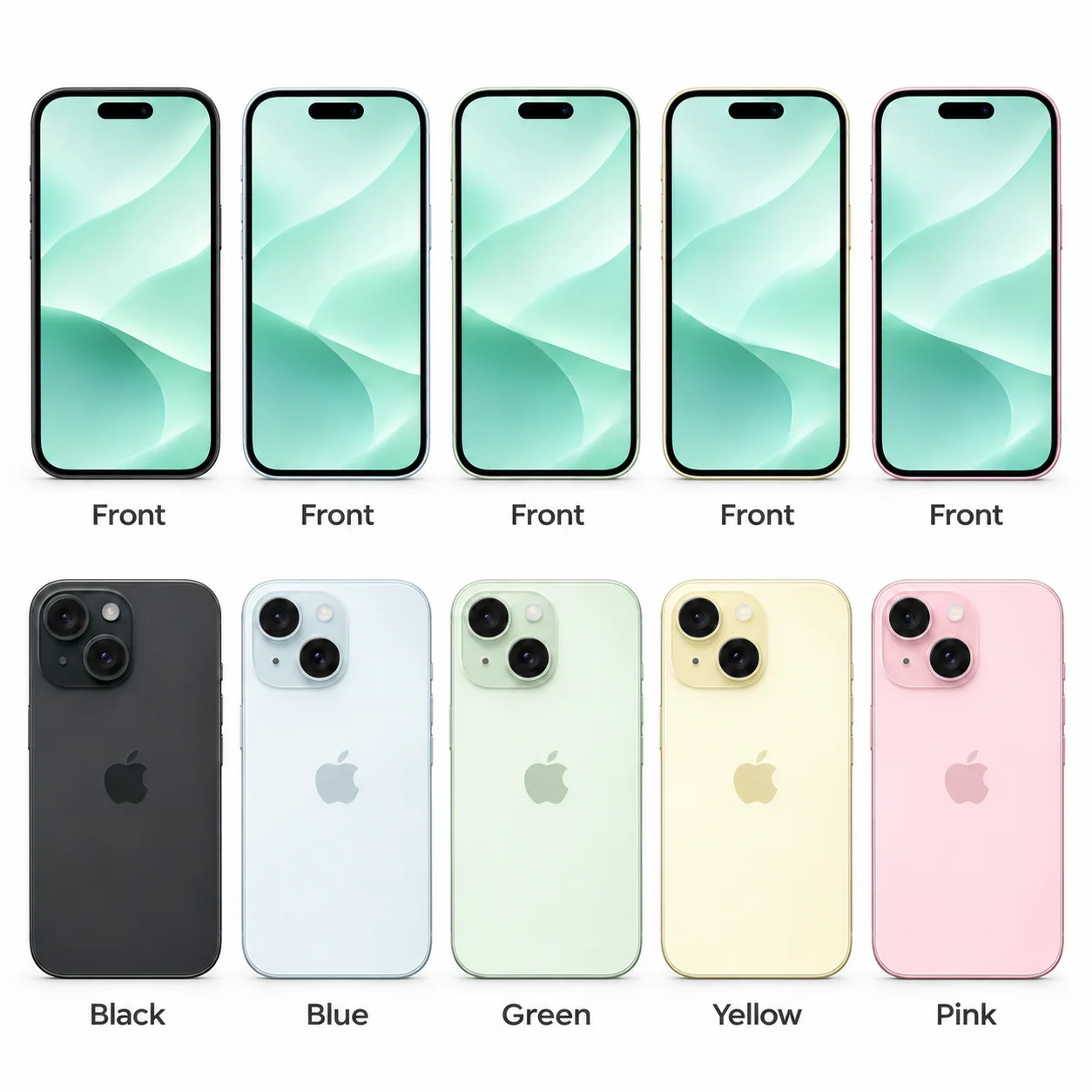
iPhone 15 model numbers
A model number identifies the model or hardware version and is shared by many devices. Your serial number identifies your individual device, as does the IMEI.
Where to find your model number
- Open Settings, then General, then About.
- Where available, tap the value beside Model Number to switch from the part number to the A-number.
- Match the A-number to this model's list. On older software, use the rear marking if the A-number is not shown in Settings.
If the phone will not turn on: If the handset has a SIM tray, remove the tray and read the A-number inside the slot on the display side. If there is no SIM tray, look on the display side inside the charging connector; bright overhead light helps.
All 4 A-number variants in Apple's current identification entry for iPhone 15. Regional labels are included where Apple specifies them; an unspecified regional allocation is not a UK-only claim.
Swipe the table sideways on a narrow screen.
| Model number | Country or region | Useful detail |
|---|---|---|
| A2846 | United States, Puerto Rico | Match this code to the number on your phone. |
| A3089 | Canada, Guam, Japan, Mexico, Saudi Arabia, and U.S. Virgin Islands | Match this code to the number on your phone. |
| A3092 | China mainland, Hong Kong, Macao | Match this code to the number on your phone. |
| A3090 | UK, Ireland and other countries/regions outside the listed regional groups | Apple groups this code under 'other countries and regions'; the UK specification confirms this regional hardware family. |
All 5 standard colours
These are the original manufacturer finishes listed for this model, including documented later colours. Availability varied over time and by market.
- Black
Approximate colour hint; the finish can look different with lighting, wear and replacement parts.
- Blue
Approximate colour hint; the finish can look different with lighting, wear and replacement parts.
- Green
Approximate colour hint; the finish can look different with lighting, wear and replacement parts.
- Yellow
Approximate colour hint; the finish can look different with lighting, wear and replacement parts.
- Pink
Approximate colour hint; the finish can look different with lighting, wear and replacement parts.
Use the colour and the model number together. Lighting, screen settings, cases and replacement backs can change how a device looks.
Getting to know the iPhone 15
Where the iPhone 15 fits
The iPhone 15 is the standard 6.1-inch model from 2023. It introduces Dynamic Island and USB-C to this standard size, while keeping an aluminium frame and two diagonal rear cameras. Black, Blue, Green, Yellow and Pink are its finish options.
Screen, cameras and everyday controls
A 48MP Main camera supplies both the ordinary and 2x views; the separate 12MP Ultra Wide fits more into the frame. The front TrueDepth camera supports Face ID. These features differ from the three-camera system and ProMotion display found on the iPhone 15 Pro.
Checking the exact handset
The regular 15 uses the ring/silent switch rather than the Pro model's Action button. Capacity choices are 128GB, 256GB and 512GB. Check Model Name and the A-number before buying an accessory, because a similar 6.1-inch diagonal does not mean identical body dimensions.
Specifications and what they mean
Read each specification alongside its explanation. Manufacturer test figures describe controlled conditions; age, usage and battery condition affect everyday performance.
Swipe the table sideways on a narrow screen.
| Feature | iPhone 15 | What it means |
|---|---|---|
| Introduced | 2023 | The year Apple records for this distinct model. |
| Screen | 6.1-inch OLED | The diagonal measures the display, not the overall phone body. Rounded corners can reduce the viewable area. |
| Resolution | 2556 × 1179 pixels; 460 ppi | Pixel dimensions describe the image grid; ppi is the number of pixels per inch. |
| Size and weight | 147.6 × 71.6 × 7.80 mm; 171 g | Height × width × depth before adding a case. Figures are from Apple’s UK specification. |
| Construction | Aluminium frame and glass back; Ceramic Shield front | Materials and shape help identify the device; a case can hide these details. |
| Processor | A16 Bionic | The main Apple chip processes apps, graphics and camera tasks. |
| Storage | 128GB, 256GB, 512GB | All capacities recorded in Apple’s complete identification range; usable space is lower and availability varied over time. |
| Rear cameras | 48MP Main and 12MP Ultra Wide | Different lenses give different fields of view. A zoom setting does not necessarily represent an additional lens. |
| Front camera | 12MP TrueDepth | Used for selfies or video calls where fitted; TrueDepth also supports Face ID. |
| Wired connection | USB-C | Use a cable that matches this connector when charging or connecting to a computer. |
| Wireless charging | MagSafe and Qi | Use compatible charging equipment. A magnetic case does not change the phone’s built-in charging specification. |
| Mobile connection | 5G and 4G LTE | The network, plan, regional hardware and available local service determine connectivity. |
| SIM: UK specification | Nano-SIM and eSIM; dual eSIM supported | Imported variants can differ. eSIM requires network support where listed. |
| Unlocking | Face ID | The listed hardware distinguishes fingerprint, facial-recognition and older Home-button designs. |
| Software compatibility | Listed for iOS 27 | Compatibility checked on 20 November 2026; individual features and later updates must be checked separately. |
Software and security updates
Apple lists iPhone 15 as compatible with iOS 27, checked on 20 November 2026. Features vary by model and region. Open Settings, General, then Software Update to see the versions offered to your handset.
Common questions about the iPhone 15
Does the iPhone 15 have an Action button?
No. The standard iPhone 15 has a ring/silent switch. The Action button appears on the 15 Pro and 15 Pro Max. All of these models use USB-C, so the connector alone does not distinguish the standard and Pro versions.
How do I identify my iPhone 15?
Apple lists A2846, A3089, A3092, A3090 for iPhone 15. Check Settings, General, About, then tap Model Number where supported to reveal the A-number. For an older phone, check the marking on the rear. Match the complete code, because finish and screen size are only supporting clues.
How does the iPhone 15 charge?
iPhone 15 uses USB-C for wired charging. Apple also lists MagSafe and Qi wireless charging. Use compatible equipment and check the handset's charging port for visible damage if it charges unreliably.
Is the iPhone 15 compatible with iOS 27?
Apple lists iPhone 15 as compatible with iOS 27, checked on 20 November 2026. Features vary by model and region. Open Settings, General, then Software Update to see the versions offered to your handset.
About this guide
Manufacturer information checked 20 November 2026. Regional features, software availability and colours can vary. Pictures are visual guides; colours and small details are approximate.