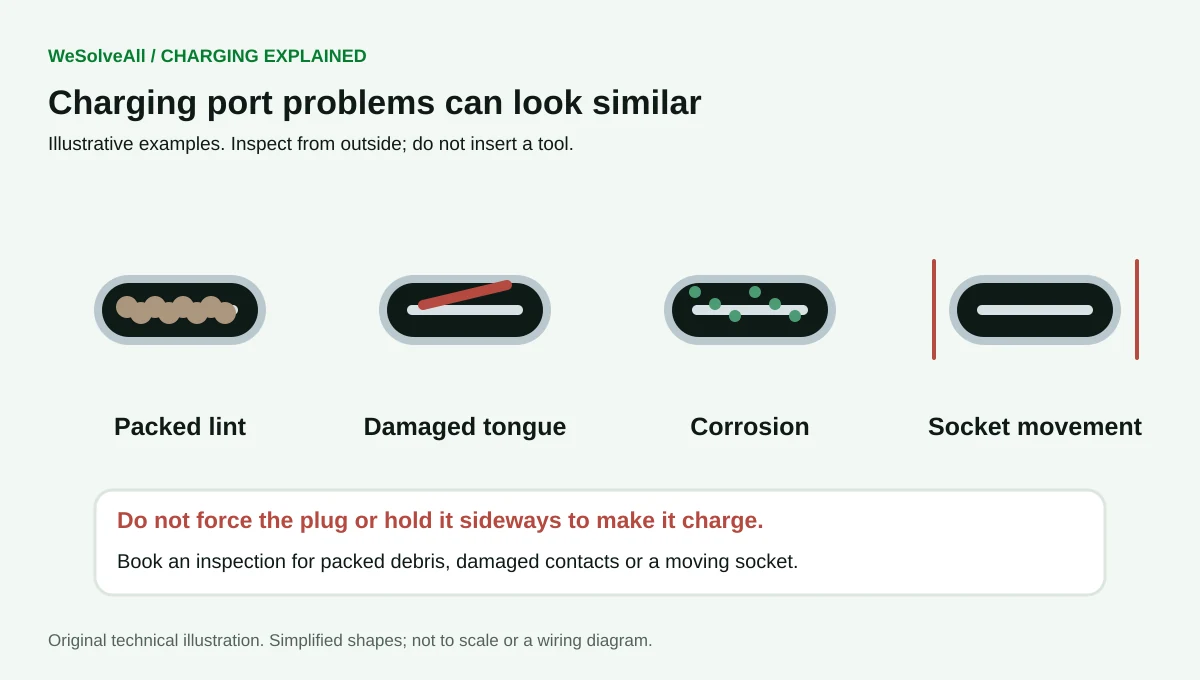
A loose or unreliable charging connection can come from a worn cable, packed lint, a damaged socket or an internal fault. Check accessories and inspect the port without inserting anything. If debris is packed inside, contacts are damaged or the socket moves, arrange professional cleaning or repair.
The plug will not go all the way in
First remove any case that could obstruct it and confirm you have the right cable. If the correct connector still stops early, do not push harder. Compacted pocket lint, a damaged plug or a bent part inside the socket can all prevent full insertion.
USB-C and Micro-USB sockets contain a small internal tongue and delicate contacts. Forcing a plug against an obstruction can turn a cleaning job into a damaged connector. A charging plug is not a tool for compressing whatever is in the socket.
It charges only at a particular angle
That does not necessarily mean the whole port needs replacement. The cable end may be worn, the cable may be broken near the connector, or the port may be obstructed. A loose socket or damaged connection inside the device is another possibility.
Stop holding the plug sideways or propping it against something. That keeps loading the socket and can make damage worse. Try a known-good compatible cable in a normal position. If the fault remains, arrange an inspection rather than using pressure as a workaround.
How to check the port safely, step by step
- Disconnect the charger. Stop immediately if there is liquid, burning, melting, swelling or abnormal heat.
- Switch the device off. Let it cool naturally if warm.
- Remove the case and inspect the cable plug. A bent, corroded or scorched plug should not go back into the device.
- Look into the port using a torch. Inspect from outside. Do not press against the centre tongue or insert a probe.
- Follow the manufacturer's model-specific cleaning advice. Google advises against inserting anything into a Pixel USB-C port, and describes gentle tapping against the hand with the port facing down for loose debris. [33]
- Leave packed debris and damaged contacts alone. Book professional cleaning or inspection instead of scraping deeper into the socket.
- Retest only if the port appears dry, undamaged and unobstructed. Use a compatible known-good cable without force.
Can I clean a charging port with a pin or toothpick?
Avoid it. A metal pin can bridge contacts or damage them. A toothpick can put pressure on delicate parts or break inside the socket. Cotton buds, paper and improvised picks can leave material behind. Samsung says not to insert objects into the charging port, and Apple gives similar restrictions in its liquid-alert guidance. [34], [35]
Do not pour cleaning liquid into an assembled device. Do not use a hairdryer, compressed air or a household vacuum as a general port-cleaning method. Manufacturer advice differs by device, and a port that looks dirty may also contain damage that needs inspection.
What do corrosion and bent contacts mean?
White or green deposits, darkened contacts, a damaged tongue or a visibly distorted socket need assessment. A liquid alert can clear while damage remains. Cleaning the accessible opening is not proof that the internal circuit board is unaffected.
If a USB-C connection works only one way round, try a known-good compatible cable. A normal reversible charging setup should not require selecting one orientation. If the same behaviour remains, damaged or contaminated contacts are possible; it needs diagnosis rather than a promise that a particular part will fix it.
What can a repairer do?
| Confirmed problem | Possible remedy | What needs checking |
|---|---|---|
| Worn or broken cable | Replace with a suitable cable | Connector condition, power requirements and charging reliability |
| Compacted debris, sound port | Controlled professional cleaning | Contacts and tongue remain intact; plug seats properly afterward |
| Damaged port on a replaceable charging assembly | Replace the correct assembly | Model compatibility and functions routed through that assembly |
| Port soldered to the main board | Specialist connector repair or another model-appropriate repair | Board pads, nearby parts and the economics of repair |
| Liquid-related damage | Inspection and treatment appropriate to the damage | Extent of corrosion, safety, reliability and recoverable data |
| Battery or charging-circuit fault | Repair the diagnosed cause | Do not replace a healthy port simply because charging fails |
These are possible repair routes, not diagnoses for a device we have not inspected. Designs vary: some charging sockets are on a separate board or flex assembly, while others need board-level work. A model-specific quote should explain the actual work.
What should a proper repair check include?
It should confirm secure connection and reliable charging with suitable equipment. Where the port also handles data, accessories or display output, relevant functions should be checked too. If the repair involves an assembly with microphones or other parts, those functions also matter. Water-resistance claims after opening a device need to be explained rather than assumed.
Does a charging port repair erase my data?
The port itself is not the data store, but the wider fault and repair process can affect access to data. Back up first where safe and possible, and ask the repairer what access, testing or software work is expected. Do not treat “port repair” as an unconditional guarantee that every file will remain accessible.
Can I keep using wireless charging instead?
It may be a temporary option on a compatible, otherwise safe device. It does not stop corrosion or stabilise a physically damaged socket. Get the fault assessed, particularly after liquid exposure or when the port moves within the housing.
What to ask when booking: “Can you inspect it first, confirm whether it needs cleaning or replacement, and explain which functions you will test afterwards?”
More charging help
- Phone, tablet or laptop not charging? Check these things first
- Wet charging port or moisture warning? What to do next
- USB-C, USB-A, Lightning and Micro-USB: which cable is which?
Need an assessment? Find an independent repair shop through WeSolveAll, then contact the business directly to confirm diagnosis, price and repair terms.