A GaN charger uses gallium nitride components that can help make a compact, efficient adapter. A multiport charger lets you connect several devices. These are different features: a charger can have either, both or neither.
What does GaN actually change?
GaN describes part of the technology inside the adapter. It can enable smaller designs than comparable traditional designs. It does not tell you which charging standards are supported, how much power each socket supplies, or whether the cable in your drawer is suitable. [13]
Compare a GaN product as you would any other charger: useful output, compatibility, size, quality and the number of devices you plan to connect. Do not assume it will stay cold, or charge a phone faster than another equally compatible charger simply because GaN appears on the box.
Why can a “100W charger” become slower?
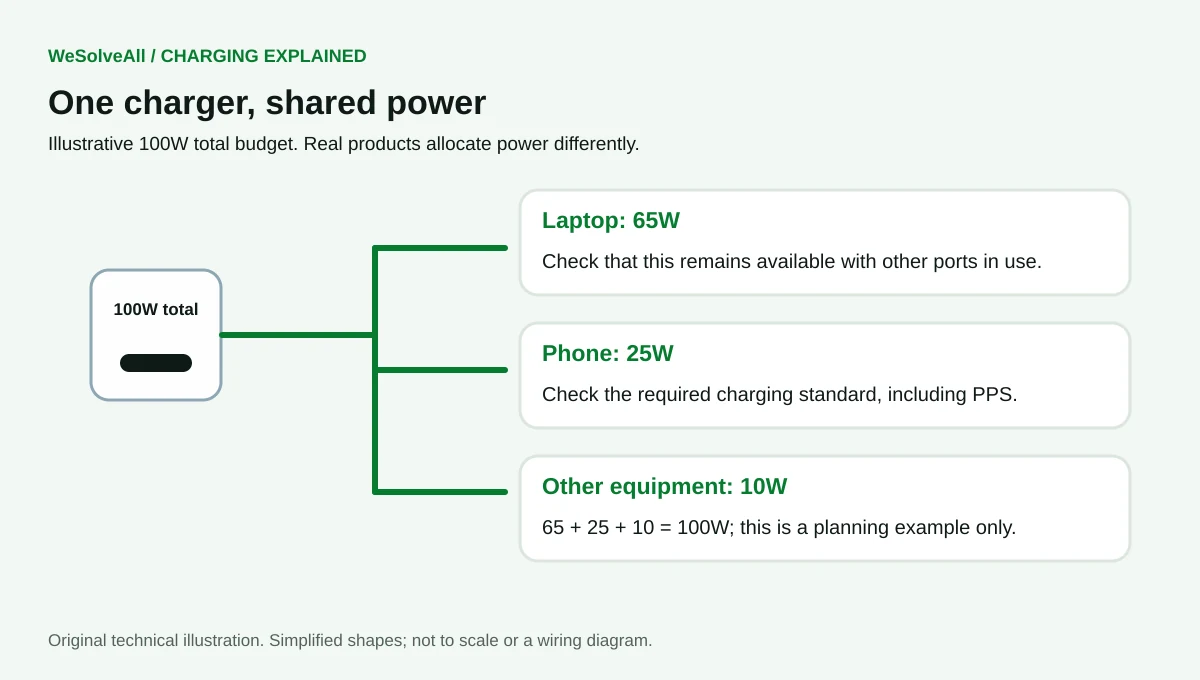
Because that number may describe the adapter's total output or the maximum available from one port under particular conditions. When another device connects, the charger may reallocate power. Different sockets may also have different limits.
For a real example, Anker documents 70W plus 30W, or 67W plus 33W, default dual-port allocations on a specified 100W three-port model, depending on the ports used. Other models use different combinations. The lesson is to read the product's output table rather than assume every socket provides the number on the front. [14]
Work out what you need at the same time
Imagine a laptop whose manufacturer recommends 65W and a phone for which you want 25W available. That gives you a 90W planning budget before adding other equipment. This arithmetic does not establish compatibility: the chosen charger still needs an output combination that actually supplies those amounts with the required protocols.
A 100W total adapter might suit that setup, or it might allocate too little to the laptop once the second port is occupied. A specification showing only the maximum single-port power does not answer the question.
How to choose a multiport charger, step by step
- List the devices you will charge together. Include the laptop, rather than planning around the phone alone.
- Find each device's recommended input. Keep the exact charging standard with the number.
- Read the multi-device output table. Check the specific two-port or three-port combination you intend to use.
- Check port labels. USB-C1 and USB-C2 may have different capabilities; a USB-A output may have separate restrictions.
- Choose a suitable cable for each device. A high-powered adapter cannot make an unsuitable cable carry more power.
- Test the combined setup. Watch for a laptop warning or charging rate change after connecting the phone.
Is it faulty if charging briefly restarts?
Some adapters renegotiate power when another device is connected or removed; consult the model's documentation. A short change can be part of that behaviour. Continual interruptions with everything left connected deserve investigation. Test devices individually and check cables, port allocation and heat before replacing equipment.
Is a charging station better for the kitchen?
A station can keep several devices together, but count its USB charging capacity separately from any ordinary mains sockets. Check the cable arrangement and available space too. If children are plugging in tablets, a stable position with no tension on the cable is more useful than an impressive number that the tablets cannot use.
Useful buying question: “How much can the laptop port supply when every other port I need is occupied?”
More charging help
- Phone and tablet fast charging: watts, PD and PPS explained
- How to choose a replacement laptop charger without guessing
- Power banks, car chargers and travel adapters: what to check