Fast charging needs a compatible device, charger and cable. Wattage tells you how much power can be supplied, while names such as USB PD and PPS describe how compatible equipment agrees that power. A bigger wattage number alone does not guarantee a faster charge.
What are watts, volts and amps?
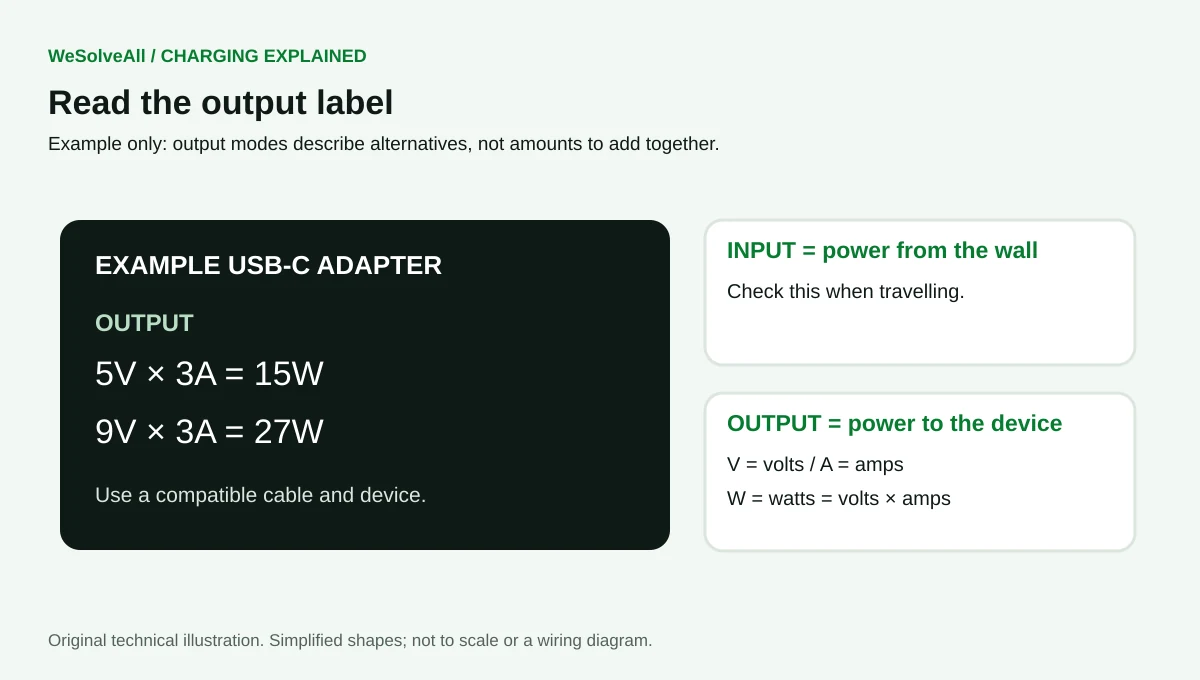
Watts, written W, measure power. Volts, written V, and amps, written A, are the two numbers multiplied to work it out. For example, an output marked 9V at 3A can supply up to 27W in that mode.
You do not need to become an electrician. Read the output information, which describes power leaving the adapter, rather than confusing it with the input information for the mains supply. Where several output modes are printed, they are alternatives. A label listing 15W and 27W modes is not promising 42W to one device.
What is USB Power Delivery?
USB Power Delivery, usually shortened to USB PD, is a shared charging standard. Compatible equipment communicates to arrange suitable power. It supports a wide range of devices, with newer Extended Power Range equipment supporting higher laptop-class outputs. You still need the specific power modes and cable your device requires. [1]
What is PPS, and why does it matter?
PPS stands for Programmable Power Supply. In plain English, it lets compatible equipment request finer adjustments in its power supply. It is relevant to supported fast-charging modes on phones. Samsung specifically advises checking PPS support, because a high-wattage adapter without it may not enable Super fast charging. [7]
For a Galaxy phone, look up the exact model and the required adapter specification. Avoid treating “45W Samsung charging always needs a 5A cable” as a rule for every generation: Samsung's current guidance includes model-dependent cable differences. A product compatibility claim should name the supported phone and charging mode, not merely say “Samsung compatible”. [7]
What about Quick Charge and manufacturers' own systems?
Qualcomm Quick Charge is another charging technology. The fast-charging benefit depends on compatible equipment; a certified adapter does not give a non-compatible phone Quick Charge capability. [8]
You may also see names such as SUPERVOOC or other branded high-speed systems. Treat their headline figures as a claim about a specified setup. For example, OnePlus specifies matching chargers and cables for its supported proprietary charging modes. A general-purpose adapter with a similar wattage may charge the device at a lower supported rate. [9]
What charger should I buy for an iPhone?
Start with the connector and generation. Eligible Lightning models use a USB-C-to-Lightning cable for wired fast charging; USB-C iPhones use a USB-C cable. Apple specifies at least a 20W adapter for fast charging on iPhone 12, iPhone SE third generation and later models. Exact peak performance and recommended equipment vary by model. [4], [10]
Do not confuse a useful starting specification with a promise that every iPhone accepts the same maximum power. Check the current official requirements if your aim is the fastest supported charging rather than simply dependable charging.
Do tablets need different chargers?
They often benefit from more available power than an old basic phone plug provides, particularly while the screen is on. However, “tablet charger” is not a single standard. Identify whether yours uses USB-C, Lightning, Micro-USB or a dedicated input, then check its recommended supply. Apple, for example, documents several USB adapter types used across its products. [11]
How to set up fast charging, step by step
- Check whether your model supports it. Look up its official wired charging requirements.
- Choose the correct standard. PD, PPS or a named proprietary system must match what the device supports.
- Use the required cable. Check both connector ends and any specified power or current rating.
- Use the right adapter port. Disconnect other equipment for an initial test, because shared output can reduce the available power.
- Check charging settings. Some devices let you disable fast charging. Menu wording changes with software and model.
- Test when the battery is lower and the device is cool. Leave demanding games or video recording until later.
- Check normal behaviour rather than one number. Charging power changes through the session; it is not supposed to stay at the advertised peak until 100%.
Why does charging slow near the end?
That can be normal battery management. Apple describes a faster first stage followed by slower charging as the battery fills. Battery temperature and charging settings also influence the process. A fast early top-up does not mean the final few per cent should take the same time. [12]
What should I ask before buying? “Will this adapter and this cable enable the supported fast-charging mode on my exact device?” That is much more useful than “Is this a fast charger?”
More charging help
- USB-C, USB-A, Lightning and Micro-USB: which cable is which?
- GaN and multiport chargers: one plug for a busy household
- Phone, tablet or laptop not charging? Check these things first