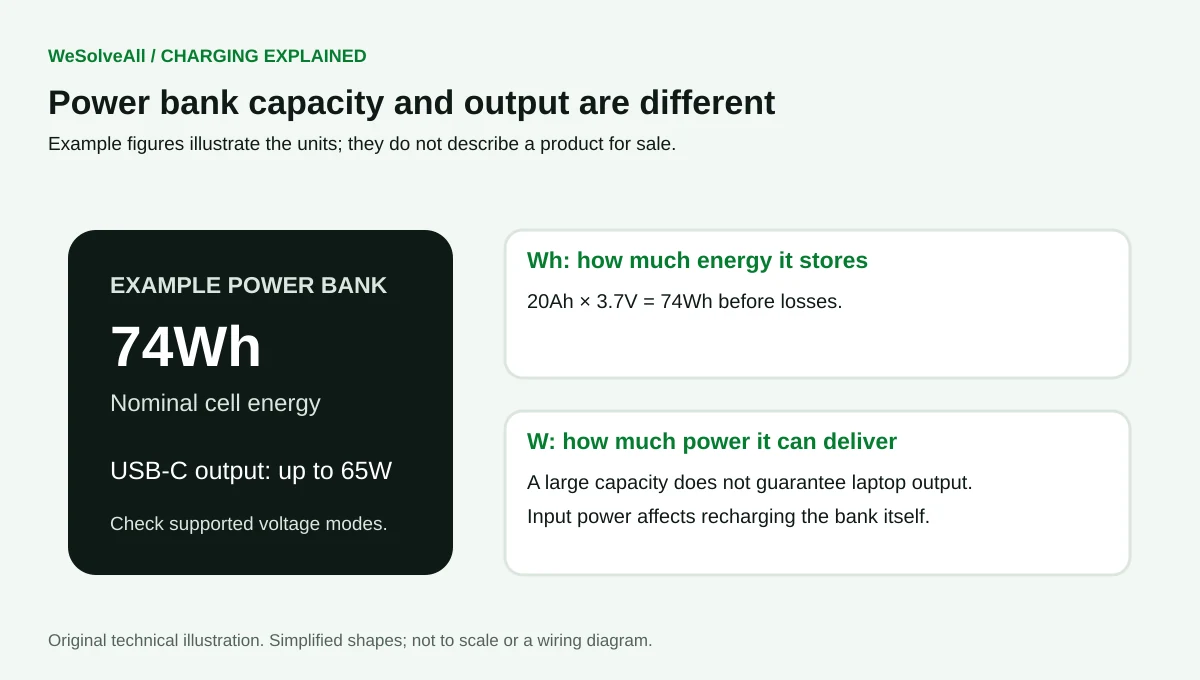
For charging away from home, check both capacity and output. A large power bank is not automatically powerful enough for a laptop, and a travel plug adapter changes the plug shape rather than the charger's electrical capability.
Power banks: two numbers doing different jobs
Capacity describes the charge or energy stored. Output describes the power the bank can deliver. A bank may hold plenty of energy but only offer a modest output suitable for a phone. Another may provide laptop-class USB-C power but still need recharging regularly because it has limited stored energy.
Milliamp-hours, written mAh, describe charge capacity at a specified voltage. Watt-hours, written Wh, describe energy and are more useful when comparing devices with different battery voltages. You cannot fairly divide one mAh label by another unless their voltage basis is the same. [27]
Why does a 20,000mAh bank not deliver 20,000mAh to a phone?
The printed figure commonly refers to the internal battery cells, while power may leave the USB socket at a different voltage. Conversion losses and the device's own charging losses also reduce usable energy. Anker explains this distinction in its capacity guidance. [28]
As a calculation example, 20Ah at 3.7V is 74Wh of nominal cell energy. If, purely for illustration, 80% reached the battery, that would be about 59Wh. Dividing 59Wh by an illustrative 15Wh phone battery suggests roughly four full-equivalent charges under those assumptions. Real results vary with the hardware, battery condition, temperature and phone use. This is an explanation of the calculation, not a promise for a product.
How to choose a power bank, step by step
- Identify the devices. Check whether a laptop accepts power-bank charging through USB-C.
- Check the required output standard and power. Look at the chosen individual output, including the available voltage modes.
- Check capacity in Wh where available. Balance useful energy against size and weight.
- Check input as well as output. Input power affects how quickly you can recharge the bank itself.
- Check shared output. Connecting a second device may reduce the power available to the first.
- Choose the right cable. The bank's highest output is of little use through an unsuitable cable.
- Check travel restrictions for your trip. Read current airline and airport rules for your exact bank and route rather than relying on a general capacity claim.
Can I charge the bank and my phone at the same time?
Only if the specific bank supports that use. This is often called pass-through charging, and it can have restrictions. Anker, for example, says its 313 Power Bank does not support it. A product offering both input and output sockets does not prove it can use them simultaneously. [29]
Car chargers: check the socket and the output
A USB port built into a car may be intended mainly for media or offer limited charging power. A compatible adapter in the vehicle's accessory socket may provide a different capability. Check the vehicle manual and the adapter's input rating, particularly for vehicles using a different electrical system.
For a phone used for navigation, use a suitable charging standard and keep it out of direct sun. Do not leave a charger or power bank baking on the dashboard. A phone may slow or suspend charging when it gets too warm. Route cables so they cannot interfere with controls.
Travel plug adapter or voltage converter?
A plug adapter changes the physical connection to the wall. It does not convert the supply voltage. Read the charger's input label. An adapter marked for 100–240V and the relevant frequency may support common destinations electrically, but you still need a suitable plug arrangement, including earthing where required. Dell's travel guidance explains this distinction. [30]
Before packing: check the destination's supply, the charger's label and the complete plug arrangement. Do not defeat an earth connection to make a travel adapter fit.
More charging help
- Phone and tablet fast charging: watts, PD and PPS explained
- GaN and multiport chargers: one plug for a busy household
- How to choose a replacement laptop charger without guessing