A desktop tower usually takes mains power through a lead into an internal power supply, or PSU. Many mini PCs and some all-in-ones use an external adapter instead. The power lead and the power supply are different parts, so check which one you actually need.
Does a desktop computer have a charger?
People often ask for a “computer charger”, which is understandable. With most desktop towers there is no main battery to recharge. The PSU converts mains electricity into the lower voltages used by the components. A monitor may have its own mains lead or power adapter and needs to be checked separately.
If the computer appears to work but the screen stays black, replacing the computer's mains lead may not address the problem. Check whether the monitor has power, whether its correct input is selected, and whether the display cable is connected.
Which power lead is which?
| Connector on the lead | What it looks like | Common use |
|---|---|---|
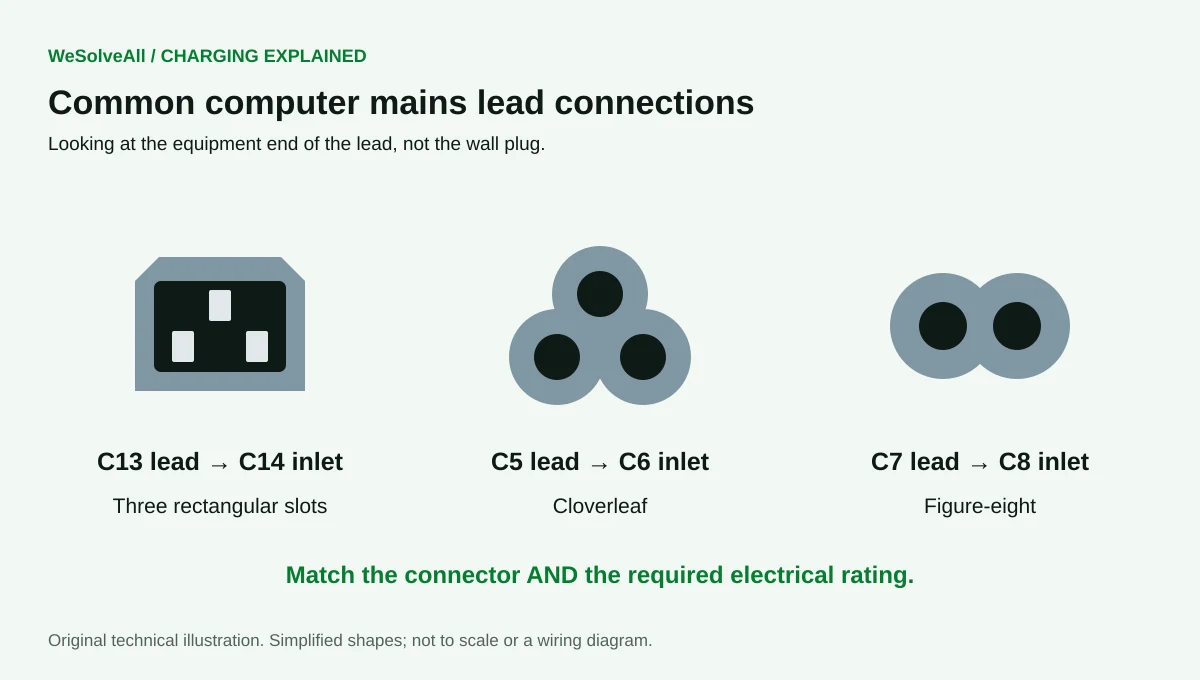
| IEC C13 | Three rectangular slots in a roughly rectangular face | Many desktop towers and monitors; fits a C14 inlet |
| IEC C5 | Three round holes in a cloverleaf shape | Many laptop bricks and other power supplies; fits a C6 inlet |
| IEC C7 | Two holes in a figure-eight shape | Some smaller power supplies and equipment; fits a C8 inlet |
These are common examples, not a complete list. Lenovo's connector reference distinguishes these leads and their matching inlets. Check the equipment's required connector and electrical rating. The similar “kettle lead” nickname is not a specification; an actual hot-appliance lead can have different requirements. [24]
What if the computer uses a power brick?
Treat an external adapter for a mini PC or all-in-one as a model-specific power supply. Check its approved output, connector and part number. A suitable-looking laptop adapter is not automatically compatible. A machine accepting USB-C power still needs the correct supported power source.
How to check a computer with no power, step by step
- Look for obvious damage. Do not reconnect a lead or adapter with exposed wires, scorching or broken insulation.
- Check the wall socket. Use a known-working socket and check its switch where fitted.
- Check the connections with power off. Make sure the lead is seated correctly at the computer and at any external adapter.
- Check the ordinary PSU on/off switch if present. Use the model manual if unsure. Do not alter a voltage selector.
- Try a known-good, correctly rated replacement lead. Do this only if the original lead or socket is undamaged and the specification matches.
- Use external model-specific diagnostics. Some computers provide a PSU test indicator or button; follow the official instructions for the exact machine.
- Arrange assessment if it still has no power. The PSU, motherboard, switch or another component may need diagnosis.
Dell's desktop troubleshooting starts with checking the mains source and cables. A computer that fails to start is not automatically a failed power supply. [25]
Can I buy any PSU with the same wattage?
No. Physical size, case fit, motherboard and graphics connectors, model-specific wiring and required power all matter. Branded office desktops can use proprietary arrangements. An “850W” label does not establish suitability, and it does not mean the computer constantly uses 850W.
Can I reuse the old internal PSU cables?
Only where the manufacturer explicitly confirms compatibility with the exact replacement. Modular PSU cables may fit physically while having different wiring at the PSU end, including between ranges from the same brand. Corsair warns that these cables are not universal. Use the correct supplied or approved cable set. [26]
Leave internal PSU repairs to a qualified technician. Do not open a power-supply casing or use improvised wire tests. Replacing a detachable mains lead is a different job from repairing mains-powered electronics.
More charging help
- Which charger do I need? A plain-English buying guide
- How to choose a replacement laptop charger without guessing
- Phone, tablet or laptop not charging? Check these things first