Pixel 11 model numbers
A model number identifies the model or hardware version and is shared by many devices. Serial numbers and mobile-network identifiers such as IMEI or MEID belong to an individual device.
Where to find your model number
- Open Settings, then About phone, and look for Model or Model and hardware.
- Where available, open Regulatory labels under About phone and copy the complete hardware code.
- Compare the full code with this guide, then check the storage capacity and original sales region. Do not use the IMEI as a public model identifier.
If the phone will not turn on: Check the original box or purchase record for the model name and hardware code. The visible camera layout and size can narrow the match, but do not open the phone just to identify it.
Verified hardware variants from Google’s specification, regulatory and compatibility records. Regional labels follow those records; this list does not claim every carrier or production revision.
Swipe the table sideways on a narrow screen.
| Model number | Country or region | Useful detail |
|---|---|---|
| GUJ0N | Rest-of-world sub-6 hardware, including Japan | Match this code to the number on your phone. |
| GPQQ7 | US mmWave and sub-6 hardware | Match this code to the number on your phone. |
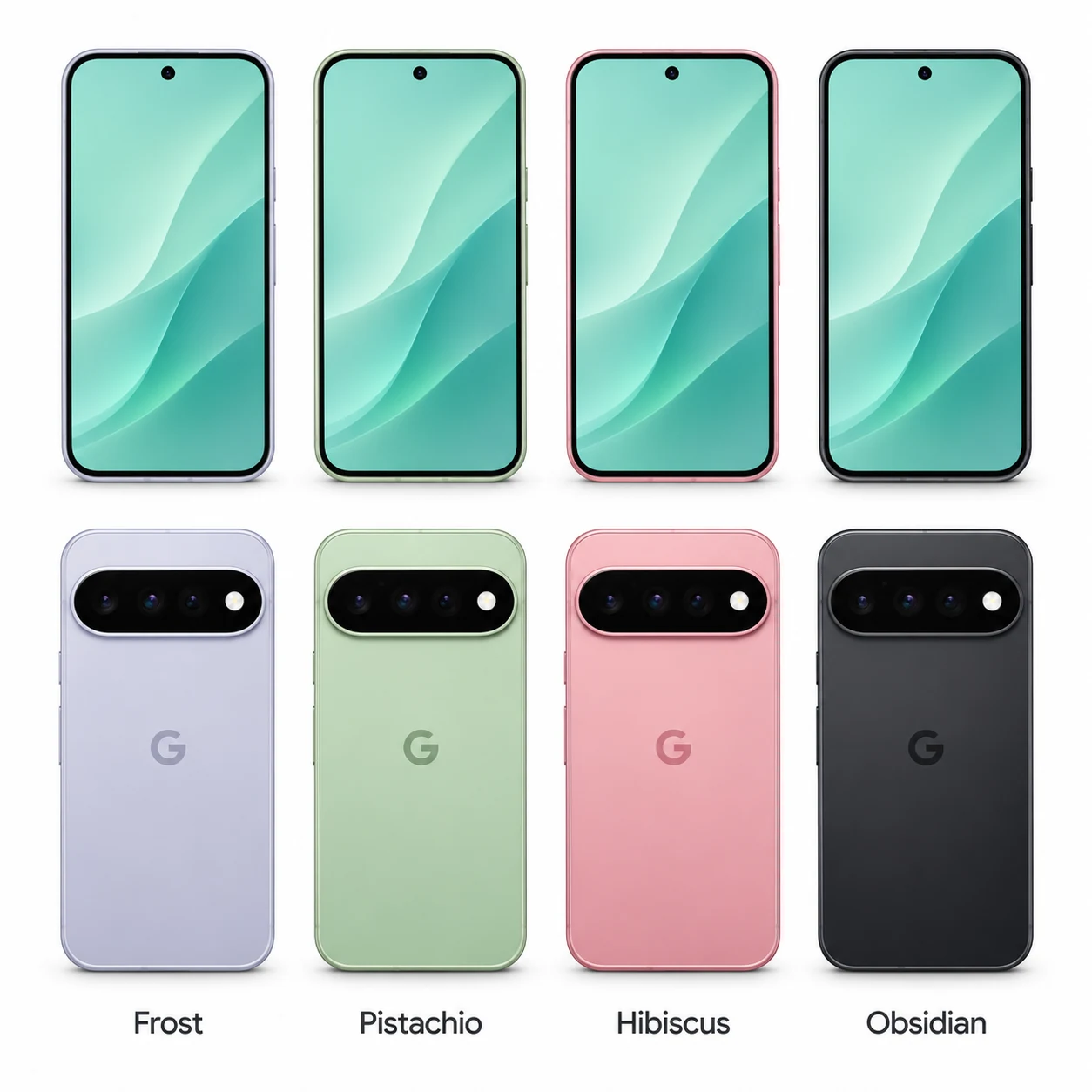
4 recorded colours
Original finishes recorded by Google for this model, including later additions where listed. Availability varies by region and capacity; a replacement rear housing can change the visible colour.
- Frost
Approximate on-screen colour hint. Lighting, wear, a case or a replacement housing can change the appearance.
- Pistachio
Approximate on-screen colour hint. Lighting, wear, a case or a replacement housing can change the appearance.
- Hibiscus
Approximate on-screen colour hint. Lighting, wear, a case or a replacement housing can change the appearance.
- Obsidian
Approximate on-screen colour hint. Lighting, wear, a case or a replacement housing can change the appearance.
Use the colour and the model number together. Lighting, screen settings, cases and replacement backs can change how a device looks.
Getting to know the Pixel 11
Screen, cameras and controls
The 6.3-inch OLED display is specified at 2424 × 1080 pixels, with up to 120hz refresh. The rear camera specification is 48MP wide, 13MP ultrawide and 10.8MP 5x telephoto; the front specification is 10.5MP. The fingerprint reader sits beneath the screen, so biometric operation is part of a screen-repair check.
Charging and connections
Pixel 11 charges through USB-C. Google also lists Pixelsnap magnetic wireless charging; Qi2.2, up to 25W. Use equipment compatible with the phone’s charging standard; a charger’s headline wattage is not a promise that the phone draws that amount continuously. Wired audio uses USB-C or a compatible adapter; there is no 3.5mm headphone socket.
Checks before a repair
For a repair enquiry, record whether the fault affects the image, touch response, each rear camera view, the selfie camera or the charging connection. Test the under-display fingerprint reader separately. Wired and wireless charging are separate checks; success with one does not identify a fault in the other. Back up accessible data and provide the complete model code before a replacement part is chosen.
Specifications and what they mean
Read each specification alongside its explanation. Manufacturer test figures describe controlled conditions; age, usage and battery condition affect everyday performance.
Swipe the table sideways on a narrow screen.
| Feature | Pixel 11 | What it means |
|---|---|---|
| Introduced | 2026 | The generation’s release year; regional on-sale dates can differ. |
| Screen | 6.3-inch OLED | Screen sizes are diagonal measurements. Rounded corners and, on a folding phone, the hinge area affect the usable viewing area. |
| Resolution | 2424 × 1080 pixels | The pixel grid describes image detail; it does not establish whether a replacement screen fits. |
| Display refresh | Up to 120Hz | Higher refresh rates can make motion look smoother. Supported settings and the displayed content affect the rate in use. |
| Size and weight | 152.8 × 72.0 × 8.6 mm; 197 g | Height × width × depth without a case. Dimensions must be matched to the exact model, especially for XL, Pro and folding versions. |
| Processor | Google Tensor G6 | The main chip runs apps, graphics and camera processing. Similar names do not imply interchangeable internal parts. |
| Storage | 256GB, 512GB | Recorded factory storage options. Available capacity is lower; colour, region and sales channel can restrict the combinations offered. |
| Memory (RAM) | 12GB | Working memory is separate from the storage used for photos, apps and files. |
| Rear cameras | 48MP wide, 13MP ultrawide and 10.8MP 5x telephoto | Separate camera modules provide different fields of view. Test each available camera view when reporting a focus or image fault. |
| Front camera | 10.5MP | Used for selfies and video calls; folding phones have different cameras for open and closed use. |
| Battery capacity | 4,985mAh typical | Original published capacity, not a measurement of remaining battery health. Runtime depends on age, settings, signal and use. |
| Wired connection | USB-C | The connector shape identifies the cable; charging speed also depends on compatible power equipment. |
| Wireless charging | Pixelsnap magnetic wireless charging; Qi2.2, up to 25W | A magnetic case does not change the wireless charging hardware built into the phone. |
| Mobile connection | 5G and 4G LTE | Regional radio bands, the network and local service determine actual connectivity. Imported hardware should be checked against the operator’s requirements. |
| Biometric unlocking | Under-display fingerprint reader | The location and type of biometric hardware are useful identification clues and separate repair checks. |
| Headphone socket | No 3.5mm socket | USB-C audio accessories and adapters must be compatible where a separate headphone socket is absent. |
| Google update policy | 7-year policy; published window through August 2033 | Policy checked on 21 November 2026. The release-based support window is separate from app compatibility and any repair warranty. |
Software and service compatibility
Google’s published policy gives Pixel 11 7 years of Android and security updates from its first US Google Store availability in August 2026. That places the published support window through August 2033. The clock starts at release, not when a second-hand phone is purchased. Checked on 21 November 2026.
Common questions about the Pixel 11
How do I identify my Pixel 11?
Open Settings, then About phone, and look for Model. Where available, open Regulatory labels to read the hardware code. The verified references recorded here are GUJ0N, GPQQ7. Match every character, including zeros and letters; colour and a similar camera housing are supporting clues.
What should I check before arranging a Pixel 11 repair?
For a repair enquiry, record whether the fault affects the image, touch response, each rear camera view, the selfie camera or the charging connection. Test the under-display fingerprint reader separately. Wired and wireless charging are separate checks; success with one does not identify a fault in the other. Back up accessible data and provide the complete model code before a replacement part is chosen.
How does the Pixel 11 charge?
Pixel 11 has a USB-C charging connector. It also supports Pixelsnap magnetic wireless charging; Qi2.2, up to 25W. Wireless charging requires compatible equipment and correct alignment.
Does the Pixel 11 still receive Google software updates?
Google’s published policy gives Pixel 11 7 years of Android and security updates from its first US Google Store availability in August 2026. That places the published support window through August 2033. The clock starts at release, not when a second-hand phone is purchased. Checked on 21 November 2026.
About this guide
Device details checked 21 November 2026. Regional features, software availability and colours can vary. Pictures are visual guides; colours and small details are approximate.