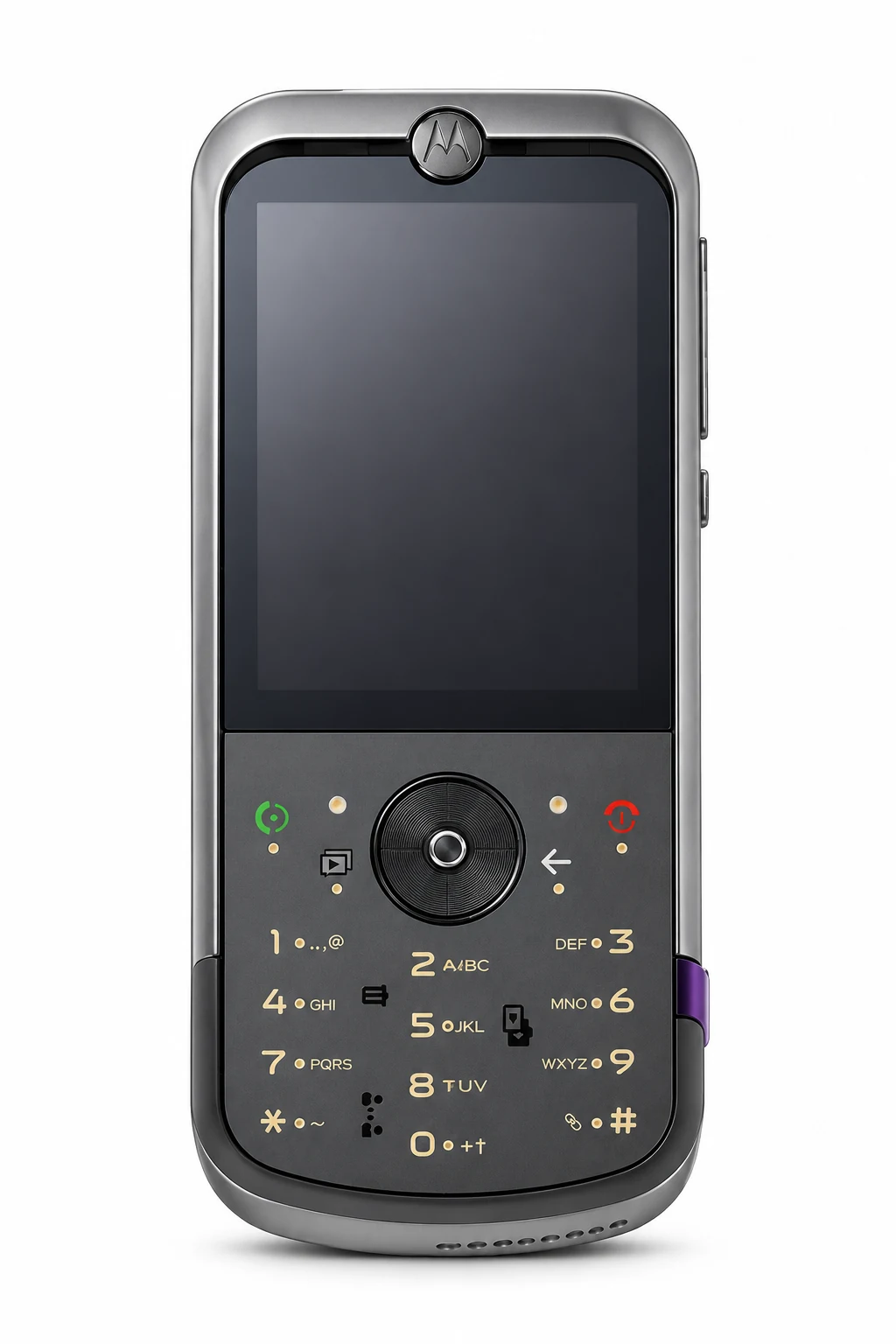
ZN5 model reference
A model reference identifies the recorded model. The complete marking on a device can include an additional hardware prefix or regional suffix. Serial numbers and mobile-network identifiers such as IMEI or MEID belong to an individual device.
Where to find your model reference
- Read the model marking on the original box or device label.
- Where the handset has a user-removable battery, switch it off before checking the label underneath.
- Copy the complete model reference. An IMEI or serial number identifies the individual phone rather than its model.
If the phone will not turn on: Check the original box and external label. If the phone was designed with a user-removable battery, switch it off before checking beneath it. Do not prise open a sealed phone simply to identify it.
Only the model sales reference is established; it is not presented as a verified separate hardware code.
Swipe the table sideways on a narrow screen.
| Model reference | Reference scope | Useful detail |
|---|---|---|
| Motorola ZN5 | Sales reference; compare the original label for a separate hardware code | Match this code to the number on your phone. |
Keep the hardware model code separate from a store SKU, storage option, serial number and IMEI. An order code may identify a colour bundle without establishing hardware compatibility.
Original finish
Recorded original finishes. Country, storage and sales channel can affect availability; colours are identification clues rather than a stock list.
- Grey
Approximate screen colour. Lighting, wear and replacement housings can alter appearance.
Use the colour and the model reference together. Lighting, screen settings, cases and replacement backs can change how a device looks.
Getting to know the ZN5
Screen, cameras and controls
The recorded screen is 2.4-inch TFT, with 240 x 320 pixels, 4:3 ratio (~167 ppi density). Check the display, navigation controls and keypad individually when describing a fault. Its rear camera specification is 5 MP, AF.
Charging and connections
The recorded wired connection is 2.0. Inspect the cable and port and note whether the charging fault occurs with more than one compatible accessory. The battery specification is Removable Li-Ion 950 mAh battery (BX50).
Checks before and after a repair
Record the full model reference, sales region and storage, then back up accessible data. Ask the shop to record the reported fault and check the same functions before and after the repair. Include the display, touch or keypad, calls, microphone, speakers and cameras that are fitted.
Specifications and what they mean
Read each specification alongside its explanation. Manufacturer test figures describe controlled conditions; age, usage and battery condition affect everyday performance.
Swipe the table sideways on a narrow screen.
| Feature | ZN5 | What it means |
|---|---|---|
| Introduced | 2008 | The recorded introduction year. Announcement and regional sale dates can differ. |
| Screen | 2.4-inch TFT | The diagonal and panel type help identify the generation. Match the complete model code before selecting a replacement screen. |
| Resolution | 240 x 320 pixels, 4:3 ratio (~167 ppi density) | This describes image detail; a matching resolution alone does not make a screen compatible. |
| Additional display details | ModeShift morphing keypad | A cover or secondary display is a separate component where fitted; test each display on its own. |
| Size and weight | 118 x 50.5 x 12-16 mm; 114 g (4.02 oz) | Original body measurements without an added case. Materials and regional versions may change weight and fit. |
| Storage | 350MB | Built-in space for files and software. Usable capacity is lower, and regional storage choices can differ. |
| Memory card | microSDHC (dedicated slot) | Match the card format, supported capacity and tray arrangement; a shared slot can replace the second SIM. |
| Rear camera | 5 MP, AF | Test focus and image quality in each available view. Sensor resolution does not describe the position or compatibility of a camera module. |
| Battery | Removable Li-Ion 950 mAh battery (BX50) | The original battery specification does not measure the remaining capacity of an aged battery. |
| Wired connection | 2.0 | Use a cable and charger intended for this connector. A matching plug does not guarantee the same charging or data capability. |
| Mobile connection | 2G GSM | Service depends on the exact radio bands, carrier and local networks. Check older or imported devices with the intended operator. |
| SIM | Mini-SIM | Keep the SIM size and regional tray arrangement when identifying the device. |
| Headphone socket | Yes | This concerns a separate 3.5mm audio socket; USB audio and adapters depend on the phone and accessory. |
| Recorded software | Linux / Java-based MOTOMAGX | This is the recorded platform, not a guarantee of current security updates or application support. |
Software and service compatibility
The recorded software specification is Linux / Java-based MOTOMAGX. This describes the model’s software history. Check the installed version, available updates and required apps on the actual handset. Its original Linux-based phone platform should not be treated as an Android installation.
Common questions about the ZN5
How do I identify my ZN5?
The recorded sales reference is Motorola ZN5. A separate complete hardware code is not established here, so check the device label and original packaging before ordering parts.
Which charging connection does the ZN5 use?
The recorded wired connection is 2.0. Inspect the cable and port and note whether the charging fault occurs with more than one compatible accessory. The battery specification is Removable Li-Ion 950 mAh battery (BX50).
Can I add a memory card to the ZN5?
The recorded card-slot specification is microSDHC (dedicated slot). Check the format and tray arrangement on the exact variant.
What should I check before a ZN5 repair?
Record the full model reference, sales region and storage, then back up accessible data. Ask the shop to record the reported fault and check the same functions before and after the repair. Include the display, touch or keypad, calls, microphone, speakers and cameras that are fitted.
What software does the ZN5 use?
The recorded software specification is Linux / Java-based MOTOMAGX. This describes the model’s software history. Check the installed version, available updates and required apps on the actual handset. Its original Linux-based phone platform should not be treated as an Android installation.
Will the ZN5 work on my mobile network?
The recorded connection type is 2G GSM. Check the full radio-band list and whether your operator provides the required service before relying on this older handset.
About this guide
Device details checked 22 November 2026. Regional features, software availability and colours can vary. Pictures are visual guides; colours and small details are approximate.