Galaxy J1 (2016) model numbers
A model number identifies the model or hardware version and is shared by many devices. Serial numbers and mobile-network identifiers such as IMEI or MEID belong to an individual device.
Where to find your model number
- Open Settings on the phone.
- Choose About phone or, on older software, About device.
- Read Model number and keep the entire code, including any suffix such as /DS.
If the phone will not turn on: Check the original box or the model marking on the device. On a model with a removable battery, switch it off and check the label beneath the battery; do not prise open a sealed phone.
Selected hardware identifiers recorded for this model. Retain every letter and any /DS suffix shown by the device; this list does not establish that every version was sold in the UK or Ireland.
Swipe the table sideways on a narrow screen.
| Model number | Country or region | Useful detail |
|---|---|---|
| SM-J120F | Regional hardware identifier; check the full code on your device | Match this code to the number on your phone. |
| SM-J120H | Regional hardware identifier; check the full code on your device | Match this code to the number on your phone. |
| SM-J120M | Regional hardware identifier; check the full code on your device | Match this code to the number on your phone. |
| SM-J120T | Regional hardware identifier; check the full code on your device | Match this code to the number on your phone. |
| SM-J120G | Regional hardware identifier; check the full code on your device | Match this code to the number on your phone. |
| SM-J120A | Regional hardware identifier; check the full code on your device | Match this code to the number on your phone. |
| SM-J120FN | Regional hardware identifier; check the full code on your device | Match this code to the number on your phone. |
| SM-J120AZ | Regional hardware identifier; check the full code on your device | Match this code to the number on your phone. |
| SM-J120ZN | Regional hardware identifier; check the full code on your device | Match this code to the number on your phone. |
| SM-J120W | Regional hardware identifier; check the full code on your device | Match this code to the number on your phone. |
A longer sales code can also identify a colour, capacity or sales region. Keep it separately from the shorter hardware model number and the individual device’s IMEI or serial number.
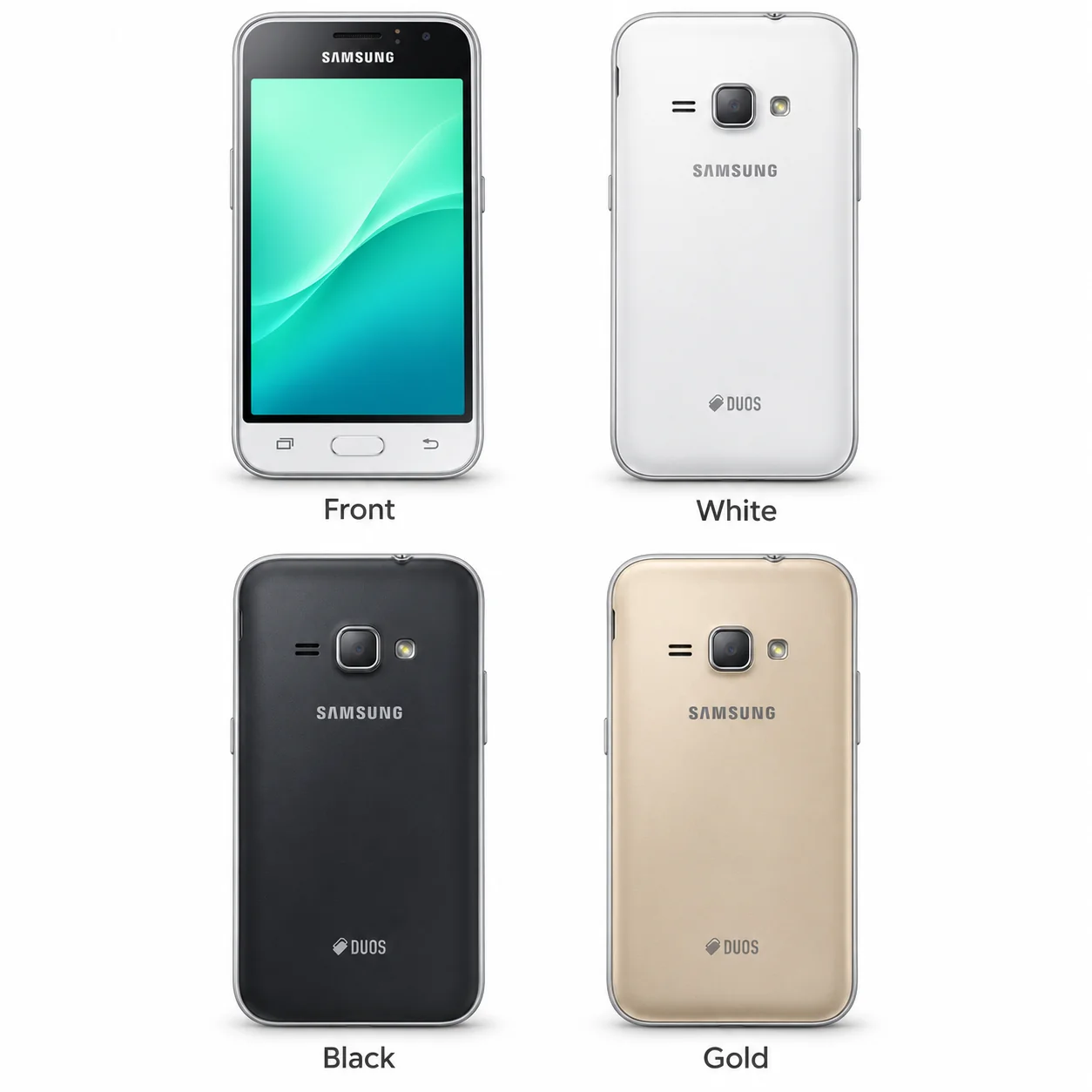
3 recorded colours
Recorded original finishes for this model, with manufacturer naming applied where verified. This is an identification guide, not a stock list.
- White
Approximate visual colour hint. Availability varied by market; lighting, wear and replacement housings can change the appearance.
- Black
Approximate visual colour hint. Availability varied by market; lighting, wear and replacement housings can change the appearance.
- Gold
Approximate visual colour hint. Availability varied by market; lighting, wear and replacement housings can change the appearance.
Use the colour and the model number together. Lighting, screen settings, cases and replacement backs can change how a device looks.
Getting to know the Galaxy J1 (2016)
Where the Galaxy J1 (2016) fits
The Galaxy J1 (2016) has a 4.5-inch Super AMOLED screen in a body measuring 132.6 x 69.3 x 8.9 mm. The recorded weight is 131 g before adding a case. Read the complete model number before ordering a case, screen protector or replacement part; similar Galaxy names can describe different hardware.
Screen, cameras and everyday use
The rear camera specification is 5MP. The front camera specification is 2MP, for selfies and video calls. When checking a used phone, test the views offered by its camera app and inspect the camera glass for damage.
Storage, charging and condition
Recorded storage options are 8GB. Software and existing files use part of that space. The memory-card specification is microSDXC (dedicated slot); check the slot arrangement for your version. Wired charging uses Micro-USB. The original battery is removable; switch the phone off before opening the battery compartment.
Specifications and what they mean
Read each specification alongside its explanation. Manufacturer test figures describe controlled conditions; age, usage and battery condition affect everyday performance.
Swipe the table sideways on a narrow screen.
| Feature | Galaxy J1 (2016) | What it means |
|---|---|---|
| Introduced | 2016 | The announcement year recorded for this hardware version; local sales dates can differ. |
| Screen | 4.5-inch Super AMOLED | The diagonal is measured across the display, not the overall phone body. |
| Resolution | 480 x 800 pixels, 5:3 ratio (~207 ppi density) | Pixel dimensions describe the image grid. Rounded corners can reduce the visible area. |
| Size and weight | 132.6 x 69.3 x 8.9 mm; 131 g | Height × width × depth before adding a case. Some regional versions can differ. |
| Construction | Glass front, plastic back, plastic frame | Materials describe the original enclosure; a replacement housing may differ. |
| Processor | Spreadtrum SC9830 | The processor handles apps, graphics and camera processing. Regional chipsets are noted where the record distinguishes them. |
| Storage | 8GB | Built-in space for apps and files. Availability varied by region; usable storage is lower. |
| Memory card | microSDXC (dedicated slot) | A memory card can expand supported file storage. Slot arrangements and supported capacities vary by hardware version. |
| Rear cameras | 5MP | Different sensors perform different jobs; the number of cameras does not by itself measure image quality. |
| Front camera | 2MP | A front camera is used for selfies and video calls where fitted. |
| Video recording | 720p@30fps | Resolution and frame rate refer to recording modes; not every camera supports every mode. |
| Wired connection | Micro-USB | Choose a cable that matches the actual connector. Do not force a plug into the socket. |
| Battery | Li-Ion 2050 mAh, removable | Original battery capacity and fitting. A used battery may hold less charge than when new. |
| Mobile connection | 4G LTE | Check the exact regional model, supported network bands and your provider’s available service. |
| SIM arrangement | Single SIM (Micro-SIM) or Dual SIM (Micro-SIM, dual stand-by) | The arrangement can vary between regional and dual-SIM versions; match the complete model number. |
| Wi-Fi | Wi-Fi 802.11 b/g/n, Wi-Fi Direct, hotspot | Wi-Fi connects the device to a compatible local wireless network. |
| Bluetooth | 4.1, A2DP, LE | Bluetooth links supported nearby accessories. |
| Headphone socket | Yes | A 3.5 mm socket accepts a conventional wired headphone plug where fitted. |
| Recorded software | Android 5.1.1 (Lollipop), upgradable to Android 6.0.1 (Marshmallow) | The software versions listed in the device record may include later updates. This is not a promise of current update support or app compatibility. |
Software and service compatibility
The database record lists Android 5.1.1 (Lollipop), upgradable to Android 6.0.1 (Marshmallow) for the Galaxy J1 (2016). Check the installed version and security patch in Settings, then look for Software update or About device. Updates, app compatibility and network services depend on the exact model, region and provider; the recorded software specification is not a current support guarantee.
Common questions about the Galaxy J1 (2016)
How do I identify my Galaxy J1 (2016)?
Open Settings and About phone or About device, then match the full model code. Recorded identifiers include SM-J120F, SM-J120H, SM-J120M, SM-J120T. A colour or approximate screen size alone is not enough to identify the hardware.
Which charging connector does the Galaxy J1 (2016) use?
The Galaxy J1 (2016) uses Micro-USB. Check the port and cable for visible damage if charging is unreliable. A compatible plug shape alone does not establish the charging speed.
Can I expand the Galaxy J1 (2016) storage?
The recorded memory-card specification is microSDXC (dedicated slot). The built-in storage options are 8GB; check the slot layout and supported card format for your model.
Does the Galaxy J1 (2016) support 5G?
No. Its recorded mobile connection is 4G LTE. Check your provider’s current compatibility before relying on an older handset.
About this guide
Device details checked 20 November 2026. Regional features, software availability and colours can vary. Pictures are visual guides; colours and small details are approximate.