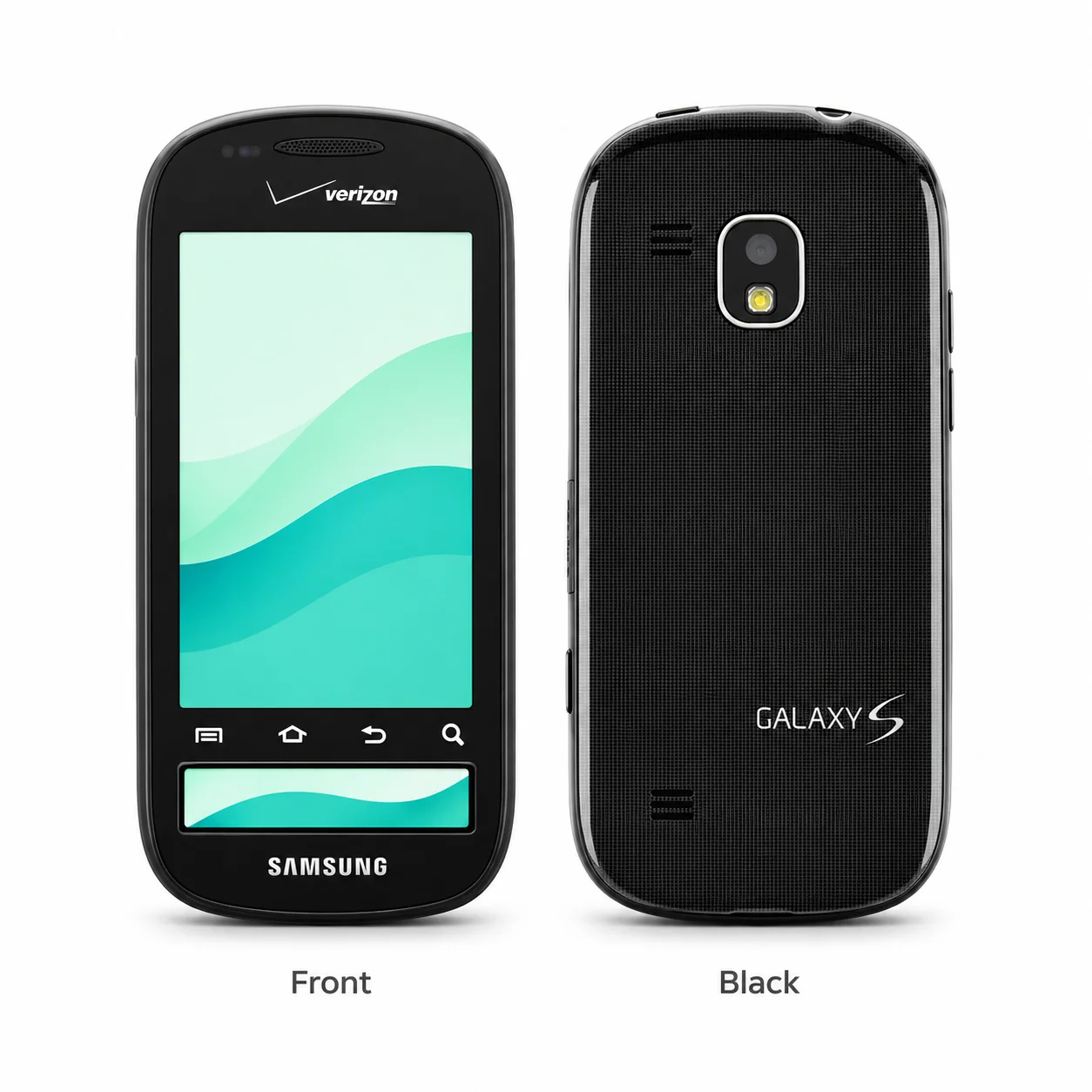
Galaxy S Continuum model numbers
A model number identifies the model or hardware version and is shared by many devices. Serial numbers and mobile-network identifiers such as IMEI or MEID belong to an individual device.
Where to find your model number
- Open Settings, then About phone or About device.
- Read Model number, including all letters, digits and any /DS suffix. The device name can be edited and is not the hardware code.
- If needed, compare the code with the original box or device label. Keep your IMEI and serial number private.
If the phone will not turn on: Read the model code on the original box or the printed label on the body. On a model with a user-removable battery, switch it off before checking the label beneath the battery; do not pry open a sealed back.
Regional hardware codes are grouped under this model. Match the complete code, including its final letters and any /DS suffix; the list does not imply that every version was sold in the UK or Ireland.
Swipe the table sideways on a narrow screen.
| Model number | Country or region | Useful detail |
|---|---|---|
| SCH-I400 | Regional hardware or network variant; check the complete suffix and local SIM/network specification. | Match this code to the number on your phone. |
Original finish
Recorded original finishes across regional releases. Colours, memory capacities and SIM options were not offered in every combination or country; a replacement rear cover may differ.
- Black
Original recorded finish; market and capacity availability can vary. Colour swatches are approximate.
Use the colour and the model number together. Lighting, screen settings, cases and replacement backs can change how a device looks.
Getting to know the Galaxy S Continuum
How to recognise the Galaxy S Continuum
A separate narrow ticker display sits beneath the main touchscreen. That second display is the clearest clue that this is the Continuum rather than the Fascinate.
Screen, cameras and body
The display measures 3.4 inches diagonally and uses Super AMOLED. The body measures 125 x 58 x 12 mm, with a recorded weight of 125 g (4.41 oz). Rear camera hardware is 5MP; the front camera is not listed for this variant. Use the measurements with the model code when checking a case or screen protector.
Storage, charging and the exact version
Recorded memory and storage options are 2GB 336MB RAM. The charging connection is microUSB 2.0. Memory-card support is microSDHC (dedicated slot), 8 GB included. Match SCH-I400 on the handset, packaging or original label before choosing accessories or arranging a repair.
Specifications and what they mean
Read each specification alongside its explanation. Manufacturer test figures describe controlled conditions; age, usage and battery condition affect everyday performance.
Swipe the table sideways on a narrow screen.
| Feature | Galaxy S Continuum | What it means |
|---|---|---|
| Introduced | 2010, November | Announcement timing; regional retail availability can be later. |
| Release | 2010, November Discontinued | Recorded release timing for the stated market; availability varied by country and network. |
| Display | 3.4-inch Super AMOLED | Screen diagonal and panel type; rounded corners reduce usable display area. |
| Resolution | 480 x 800 pixels, 5:3 ratio (~274 ppi density) | The pixel grid describes screen detail; it is separate from the physical display size. |
| Size and weight | 125 x 58 x 12 mm; 125 g (4.41 oz) | Height × width × depth unless folded/unfolded states are explicitly shown. Regional versions can differ. |
| Processor | Hummingbird | Regional models can use different chips; match the complete model code. |
| RAM and storage | 2GB 336MB RAM | RAM is working memory; storage holds apps and files. Usable storage is lower than the stated capacity. |
| Memory card | microSDHC (dedicated slot), 8 GB included | A microSD slot, where fitted, expands file storage rather than RAM. |
| Rear cameras | 5MP | Each camera serves a different view. A depth sensor is not a separately selectable picture-taking lens. |
| Battery | Removable Li-Ion battery | Capacity describes the original battery. Age, wear and settings affect practical battery life. |
| Charging connector | microUSB 2.0 | Match the plug type and avoid forcing a cable into a damaged port. |
| SIM | Mini-SIM | SIM configuration varies by regional model; eSIM also depends on the mobile network. |
| Mobile network | CDMA / EVDO | This describes radio families rather than guaranteed coverage or support by every operator. |
| Wi-Fi and Bluetooth | Wi-Fi 802.11 b/g/n, DLNA, hotspot (Android OS v2.2); Bluetooth 3.0, A2DP | Compatible routers and accessories are required to use the listed connection features. |
| 3.5mm headphone socket | Yes | A phone without this socket needs a suitable digital adapter or wireless headphones. |
| Launch software | Android 2.1 (Eclair) | This is the original software family, not a guarantee of the latest update available today. |
Software and service compatibility
This model originally shipped with Android 2.1 (Eclair). Check Settings, then Software update or About device, for the versions offered to your exact regional handset. The installed Android version and security-patch date are separate checks; carrier and country variants can receive different updates.
Common questions about the Galaxy S Continuum
How do I identify my Galaxy S Continuum?
Check Settings, then About phone or About device, and read the complete model number. This guide records SCH-I400. A separate narrow ticker display sits beneath the main touchscreen. That second display is the clearest clue that this is the Continuum rather than the Fascinate.
What colours did the Galaxy S Continuum come in?
The recorded finish range is Black. Availability varied by market, carrier and storage capacity. A case or replacement housing can change the apparent colour, so match the model code as well.
What charger and storage does the Galaxy S Continuum use?
The wired connector is microUSB 2.0. Recorded memory/storage choices are 2GB 336MB RAM. The memory-card specification is microSDHC (dedicated slot), 8 GB included. Match the regional code when checking a used phone.
About this guide
Device details checked 20 November 2026. Regional features, software availability and colours can vary. Pictures are visual guides; colours and small details are approximate.