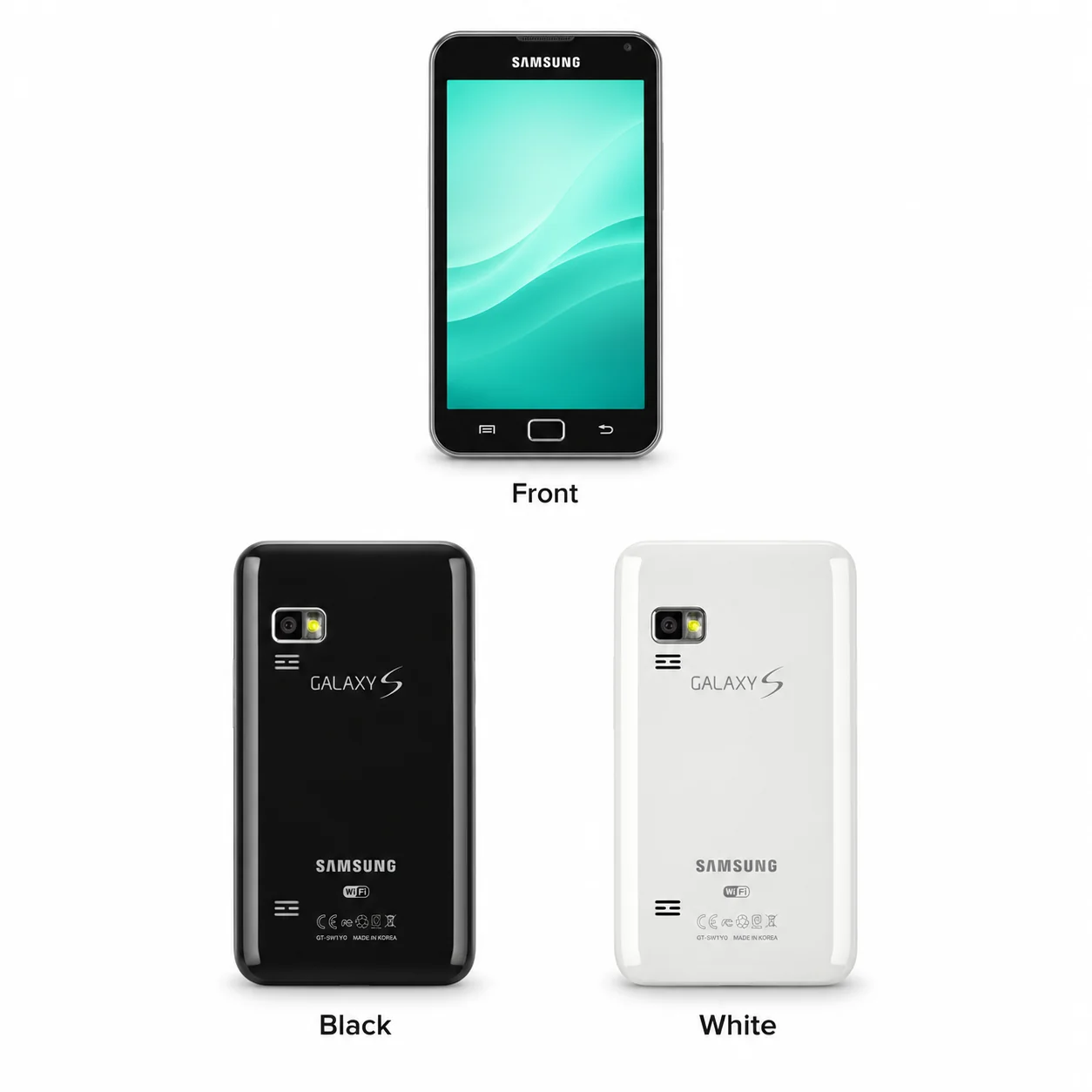
Galaxy S WiFi 5.0 model numbers
A model number identifies the model or hardware version and is shared by many devices. Serial numbers and mobile-network identifiers such as IMEI or MEID belong to an individual device.
Where to find your model number
- Read the model number on the body or the original product label.
- Copy the complete hardware identifier, not the serial number.
- Match that identifier with the listed codes and compare the lens or display layout.
If the media player will not turn on: Read the model marking on the body or original box label. Do not open a sealed device just to identify it.
Recorded model identifiers, supplemented where the database leaves a gap or includes a conflicting code.
Swipe the table sideways on a narrow screen.
| Model number | Country or region | Useful detail |
|---|---|---|
| YP-G70 | Recorded hardware variant; regional availability varies | Match the complete device code. Additional sales suffixes can identify market, capacity and finish. |
The model number identifies hardware. The serial number identifies an individual unit; a longer sales code may include market, capacity and finish.
2 recorded colours
Recorded original finishes and case/band combinations. Special-edition names and interchangeable replacement bands are not treated as separate colour finishes.
- Black
Approximate colour hint. Original combinations and availability can vary by case size or market.
- White
Approximate colour hint. Original combinations and availability can vary by case size or market.
Use the colour and the model number together. Lighting, screen settings, cases and replacement backs can change how a device looks.
Getting to know the Galaxy S WiFi 5.0
A media player rather than a cellular phone
This model records 8/16GB and microSDHC (dedicated slot) storage expansion. Its phone-like touchscreen body should not be mistaken for built-in mobile-network support.
Screen, camera and audio
The 5.0-inch LCD display is paired with 3.15 MP, AF camera hardware. The specification also records a 3.5 mm headphone connection: Yes. Test headphone and loudspeaker output separately when describing an audio problem.
Connections and model marking
The wired connection is microUSB 2.0. Match the YP-G70 identifier and check the physical port before choosing a cable or replacement part; a similarly sized Galaxy phone can have different hardware.
Specifications and what they mean
Read each specification alongside its explanation. Manufacturer test figures describe controlled conditions; age, usage and battery condition affect everyday performance.
Swipe the table sideways on a narrow screen.
| Feature | Galaxy S WiFi 5.0 | What it means |
|---|---|---|
| Introduced | 2011 | Introduction year; later connectivity or finish variants may have different release dates. |
| Display | 5.0-inch LCD | Recorded display diagonal. Where this family has several case sizes, the main entry describes the listed configuration. |
| Resolution | 480 x 800 pixels, 5:3 ratio (~187 ppi density) | Pixel dimensions describe the display, not the outer body. |
| Processor | 1.0 GHz S5P-C111 | Processor recorded for this device configuration. |
| Storage and memory | 8/16GB | Storage holds files and applications; RAM is working memory. Capacity can vary by version and market. |
| Body size | 141.3 x 78.2 x 11.9 mm (5.56 x 3.08 x 0.47 in) | Bare-device dimensions for the recorded configuration. Watch case sizes can have separate dimensions; see the case-size notes. |
| Weight | 182 g (6.42 oz) | Listed device weight; straps, cases and accessories can change the total. |
| Battery | Removable Li-Po 2500 mAh battery | Original battery specification; actual runtime depends on age, condition, settings and usage. |
| Wired connection | microUSB 2.0 | A data connector and its charging requirements should be checked separately. |
| Bluetooth | 3.0 | Requires compatible equipment and software. |
| Wi-Fi | Wi-Fi 802.11 b/g/n, hotspot | Availability of a radio feature does not establish current online-service compatibility. |
| Mobile network | No cellular connectivity | Hardware and supported networks vary by model and market. Older services may no longer operate locally. |
| SIM provision | No | A SIM or eSIM listing describes hardware support, not a currently active mobile plan. |
| Recorded software | Android 2.2 (Froyo) | The database can include later software updates; this is not a factory-version or current-support guarantee. |
| Camera | 3.15 MP, AF | Recorded camera hardware; optical zoom is distinct from a digital crop. |
| Memory card | microSDHC (dedicated slot) | Use a compatible card format and capacity for the device. |
Software and service compatibility
This is an older Android device. Check the installed software and whether the particular applications and connections you need still work. Historical specifications do not promise present app compatibility or current security updates.
Common questions about the Galaxy S WiFi 5.0
How do I identify the Galaxy S WiFi 5.0?
The recorded hardware identifier is YP-G70. Match the complete model marking on the body or original box; the Galaxy name alone covers several different types of device.
Can the Galaxy S WiFi 5.0 make ordinary mobile calls?
The supplied specification does not record GSM voice-call support for this device. Its Android interface and any listed data connection are separate from ordinary cellular phone service.
Which cable does the Galaxy S WiFi 5.0 use?
The recorded wired connection is microUSB 2.0. Match the connector and compatible charging requirements on the individual device.
Does the Galaxy S WiFi 5.0 accept a memory card?
The recorded memory-card provision is microSDHC (dedicated slot). The card is separate from internal storage and should match the supported card format.
About this guide
Device details checked 20 November 2026. Regional features, software availability and colours can vary. Pictures are visual guides; colours and small details are approximate.