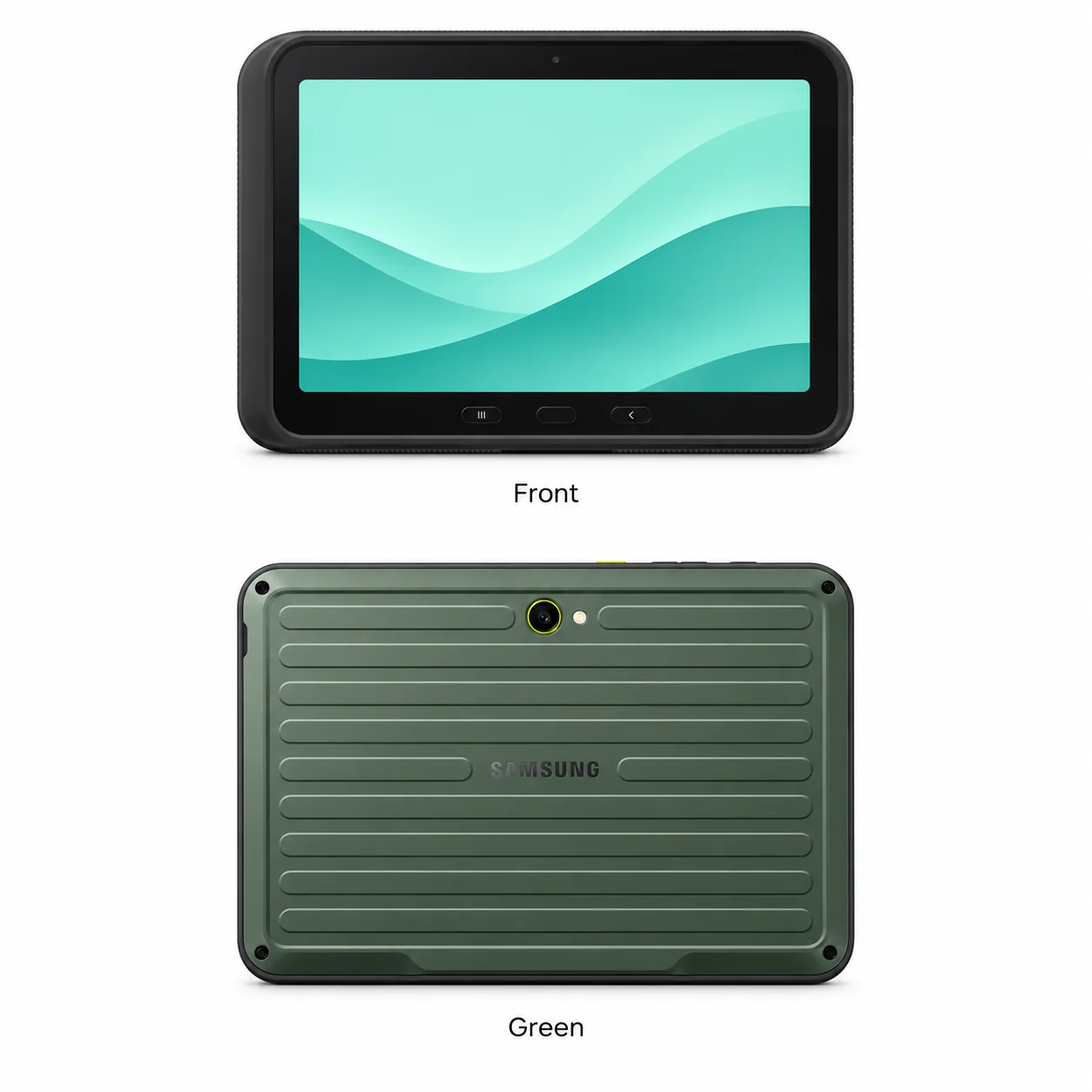
Galaxy Tab Active5 Pro model numbers
A model number identifies the model or hardware version and is shared by many devices. Serial numbers and mobile-network identifiers such as IMEI or MEID belong to an individual device.
Where to find your model number
- Open Settings and select About tablet; older versions may call this About device.
- Read Model number and copy the complete SM-, GT- or carrier code.
- Match the complete code with the list below; the marketing name alone may cover Wi-Fi, cellular and regional hardware.
If the tablet will not turn on: Read the printed model marking on the back or the original box label. Do not open a sealed tablet just to find its model number.
Recorded hardware variants for this model. The supplied device database provides the main inventory; original product labels remain the reference for a particular unit. Sales suffixes, colours, storage and regional availability can differ.
Swipe the table sideways on a narrow screen.
| Model number | Version or region | Useful detail |
|---|---|---|
| SM-X356B | Regional hardware variant | Match the complete code on the tablet. A sales suffix may also identify colour, capacity and market. |
| SM-X350 | Regional hardware variant | Match the complete code on the tablet. A sales suffix may also identify colour, capacity and market. |
Samsung sales codes can continue beyond the hardware model with characters for market, finish and capacity. The serial number and IMEI identify an individual unit and are different from the model number.
Original finish
Recorded original finish names across this model’s regional variants. A finish may be limited to particular markets, years or configurations.
- Green
Approximate colour hint; lighting, wear and replacement housings can change the appearance.
Use the colour and the model number together. Lighting, screen settings, cases and replacement backs can change how a device looks.
Getting to know the Galaxy Tab Active5 Pro
A rugged tablet with physical controls
The Galaxy Tab Active 5 Pro is part of Samsung’s rugged tablet range. Its thicker body and physical navigation buttons help distinguish it from ordinary Tab A and Tab S models. The supplied specification lists 242.9 x 170.2 x 10.2 mm, so cases need the exact generation.
Check the stylus, cover and battery assembly
This model supports the S Pen. Examine the protective cover, pen holder and battery cover when assessing a used unit, because missing accessories change what is included. Rugged construction does not establish the present condition of seals or a damaged tablet.
Identifying the right body and connector
The Galaxy Tab Active 5 Pro body measures 242.9 x 170.2 x 10.2 mm and uses USB Type-C 3.2, charging/accessories connector pins. A charging plug should match the connector without force. Match SM-X356B or another code listed here when describing the tablet to a repair shop; radio variants and replacement housings can look alike.
Specifications and what they mean
Read each specification alongside its explanation. Manufacturer test figures describe controlled conditions; age, usage and battery condition affect everyday performance.
Swipe the table sideways on a narrow screen.
| Feature | Galaxy Tab Active5 Pro | What it means |
|---|---|---|
| Introduced | 2025 | Introduction year; individual regional versions and later capacities may have arrived at different times. |
| Screen | 10.1-inch TFT LCD, 120Hz | Diagonal screen size; the outside dimensions and rounded corners are separate measurements. |
| Resolution | 1920 x 1200 pixels, 16:10 ratio (~224 ppi density) | The pixel grid describes display detail. Aspect ratio describes the shape of that grid. |
| Processor | Qualcomm SM7635 Snapdragon 7s Gen 3 (4 nm) | The chip runs applications and graphics. Radio and regional versions can use different processors where listed. |
| Storage and memory | 128GB 6GB RAM, 256GB 8GB RAM | Storage holds files; RAM is working memory. Usable storage is lower after formatting and software. Availability varies by market. |
| Memory card | microSDXC (dedicated slot) | A memory card is separate from internal storage. Card support does not guarantee every app can be installed on the card. |
| Body size | 242.9 x 170.2 x 10.2 mm (9.56 x 6.70 x 0.40 in) | Dimensions of the bare tablet before adding a case or keyboard; compare the exact hardware variant. |
| Weight | 680 g or 683 g (1.50 lb) | Radio hardware can change the weight. Cases, keyboards and covers add more. |
| Rear camera | 12 MP, f/1.8, AF | The rear camera faces away from the screen. A flash or sensor is not an additional photographic lens. |
| Front camera | 8 MP, f/2.0 | The camera facing the user is used for compatible video calls and selfies. |
| Charging and wired connection | USB Type-C 3.2, charging/accessories connector pins | Match the connector and the power requirements on the tablet. USB data capability and charging capability are separate. |
| Battery | Li-Po 10100 mAh, removable | Listed capacity describes the original battery; age, usage, temperature and condition affect actual runtime. |
| Connections | Wi-Fi 802.11 a/b/g/n/ac/6e, tri-band, Wi-Fi Direct; Bluetooth 5.4, A2DP, LE | Wireless features require compatible equipment. A Wi-Fi-only tablet cannot acquire mobile data hardware through a software update. |
| Mobile data | Wi-Fi and cellular configurations in the model list | Confirm the exact variant, SIM support and network bands. Older mobile services may no longer operate in a particular location. |
| Software at introduction | Android 15, One UI 7 | Historical software information identifies the generation. It does not establish present security support or current app compatibility. |
| Stylus | S Pen supported | Use the pen intended for this model. Bluetooth controls, charging and storage arrangements vary between generations. |
Software and service compatibility
Check Settings, then Software update, for the updates offered to this exact tablet. Older versions may place update controls under About device. Availability depends on model, market and network; the launch software listed here is historical and does not promise current security updates or a future support end date.
Common questions about the Galaxy Tab Active5 Pro
How do I identify the Galaxy Tab Active5 Pro?
Start with SM-X356B, SM-X350. Match the complete model number on your tablet. Colour and screen size support identification, but do not replace that code.
Which connection does the Galaxy Tab Active5 Pro use?
This guide records USB Type-C 3.2, charging/accessories connector pins. Use the correct connector and compatible power supply; a similarly shaped cable does not establish supported charging power or data features.
Can the Galaxy Tab Active5 Pro use a SIM card?
The model family includes cellular hardware. Some other versions may be Wi-Fi-only, so check the complete model code, physical SIM slot and settings on the particular tablet. Supported networks and bands depend on region.
Does the Galaxy Tab Active5 Pro support S Pen?
Yes. This is a pen-capable model. Check the exact replacement pen and any Bluetooth feature requirements for this generation.
About this guide
Device details checked 20 November 2026. Regional features, software availability and colours can vary. Pictures are visual guides; colours and small details are approximate.