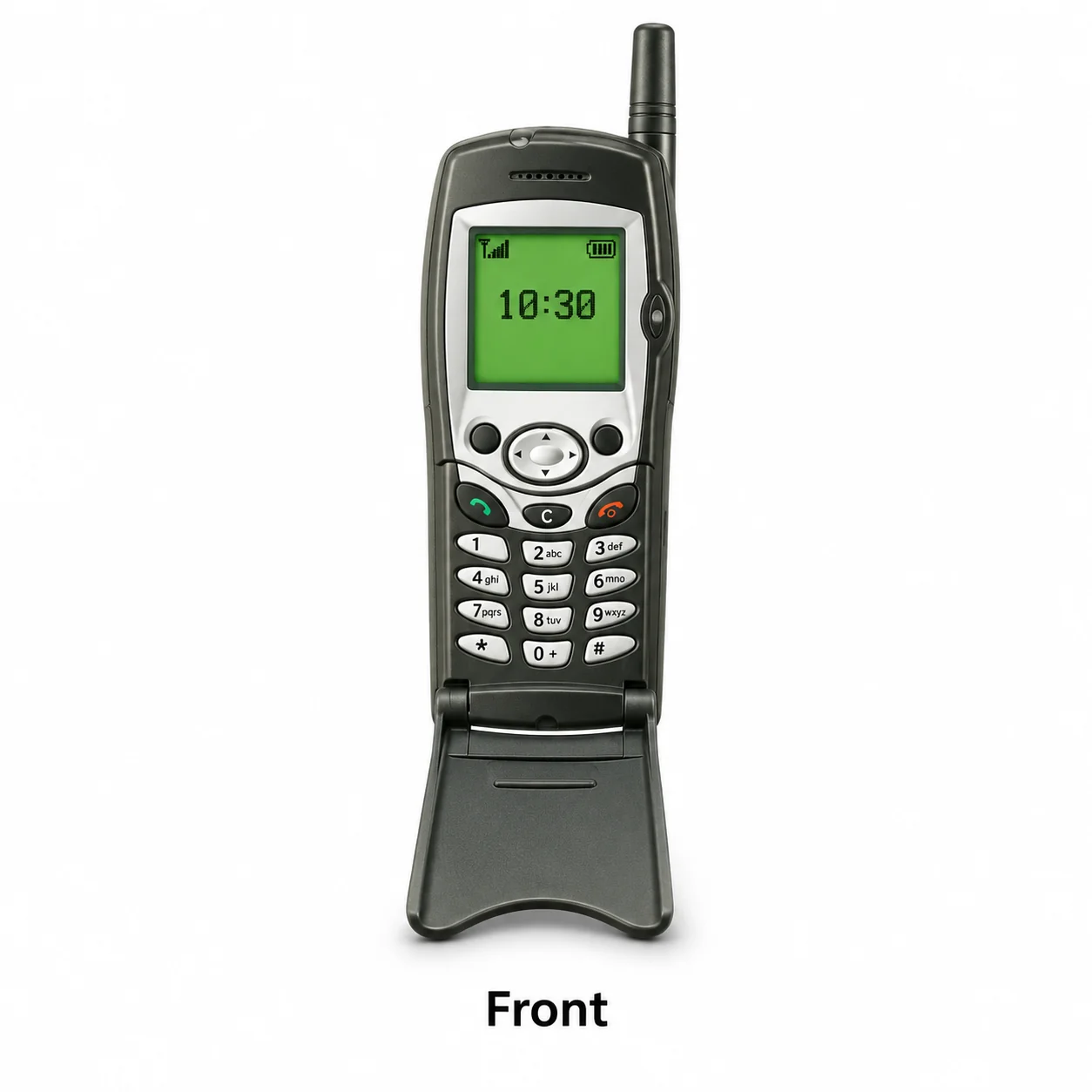
Q100 model reference
A model reference identifies the recorded model. The complete marking on a device can include an additional hardware prefix or regional suffix. Serial numbers and mobile-network identifiers such as IMEI or MEID belong to an individual device.
Where to find your model reference
- Read the complete model marking on the original box or the device label, retaining every letter, prefix and suffix.
- On a phone with a removable battery, switch it off before checking the label beneath the battery.
- Compare the label with the body shape and controls. Do not prise open a sealed housing to search for a code.
If the phone will not turn on: Check the original packaging or the model marking on the phone. If the battery is removable, turn the phone off before checking beneath it; do not force open a sealed housing.
The source gives this model reference but does not establish a complete regional hardware code. Check the full printed model marking before ordering parts.
Swipe the table sideways on a narrow screen.
| Model reference | Reference scope | Useful detail |
|---|---|---|
| Q100 | Model reference; confirm the full printed device code | Match this code to the number on your phone. |
A sales code may identify a particular market, finish or package. The IMEI and serial number identify an individual device; they are not substitutes for its model marking.
Colour identification
The supplied model record does not name the original finishes. Use the model marking and hardware details to identify the handset; no complete colour list is claimed.
Use the colour and the model reference together. Lighting, screen settings, cases and replacement backs can change how a device looks.
Getting to know the Q100
Identifying the Q100
The Q100 was announced in 2001. Its recorded body size is 112 x 42 x 18.5 mm. The recorded weight is 85 g. Compare the complete model marking with the shape, controls and connector before choosing an accessory or replacement part.
Display, controls and camera
The display specification lists Monochrome graphic. The supplied record does not establish a camera specification. Check the display and the available controls for damage or intermittent operation. Compare the actual phone with its model label; a replacement housing can change its appearance.
Memory, charging and condition
The phonebook specification lists 100. The record lists no memory-card slot. The supplied record does not identify the physical charging plug. Match the original charger specification and socket before connecting a replacement. The original battery is removable; turn the phone off before opening its battery compartment. Battery condition matters more than the original capacity when assessing an older used handset.
Specifications and what they mean
Read each specification alongside its explanation. Manufacturer test figures describe controlled conditions; age, usage and battery condition affect everyday performance.
Swipe the table sideways on a narrow screen.
| Feature | Q100 | What it means |
|---|---|---|
| Introduced | 2001 | The announcement year in the device record; local release dates can differ. |
| Screen | Monochrome graphic | The screen technology and diagonal, where recorded, describe the display rather than the full body. |
| Resolution | 128 x 128 pixels, 1:1 ratio | Pixel dimensions describe the image grid shown on the screen. |
| Size and weight | 112 x 42 x 18.5 mm; 85 g | Original body dimensions and weight, before accessories. |
| Phonebook | 100 | Contact storage can be separate from file storage on older phones. |
| Call records | 10 dialed, 10 received, 10 missed calls | The recorded call-log capacity and functions. |
| Memory card | No | Use the supported card format and check any capacity limit in the original instructions. |
| Battery | Removable Li-Ion battery | The original battery specification. Age and use affect the capacity of a used battery. |
| Mobile connection | GSM | Check the full model, regional radio bands and services currently provided by your network. |
| 2G bands | GSM 900 / 1800 | Original radio-band support; this is not a statement that a local network still operates this service. |
| SIM arrangement | Mini-SIM | Match the SIM format and any carrier restriction for the exact handset. |
| Wi-Fi | No | Recorded local wireless-network connectivity. |
| Bluetooth | No | Recorded short-range wireless connectivity for compatible devices and accessories. |
| Radio | No | Recorded broadcast-radio capability, where fitted. |
| Headphone socket | No | Whether the record lists a standard 3.5 mm audio socket. |
Software and service compatibility
This is an older handset with the functions listed in its original device record. Check the installed software where available, and confirm current network and service compatibility with the relevant provider. Recorded specifications do not guarantee present-day software support or online-service access.
Common questions about the Q100
How do I identify the Q100?
Compare the full model marking on the phone or original packaging. The recorded reference is Q100. The source gives this model reference but does not establish a complete regional hardware code. Check the full printed model marking before ordering parts.
Which charger does the Q100 use?
The supplied record does not identify the charging plug. Check the original charger specification, device marking and socket before choosing a replacement; a USB data-version entry is not enough to identify the plug.
Does the Q100 have a memory-card slot?
The record lists no memory-card slot.
Can the Q100 still connect to a mobile network?
Its recorded mobile technology is GSM. Check compatibility with your provider using the complete regional model and radio bands. The hardware specification alone does not establish that a compatible service is still available locally.
About this guide
Device details checked 20 November 2026. Regional features, software availability and colours can vary. Pictures are visual guides; colours and small details are approximate.