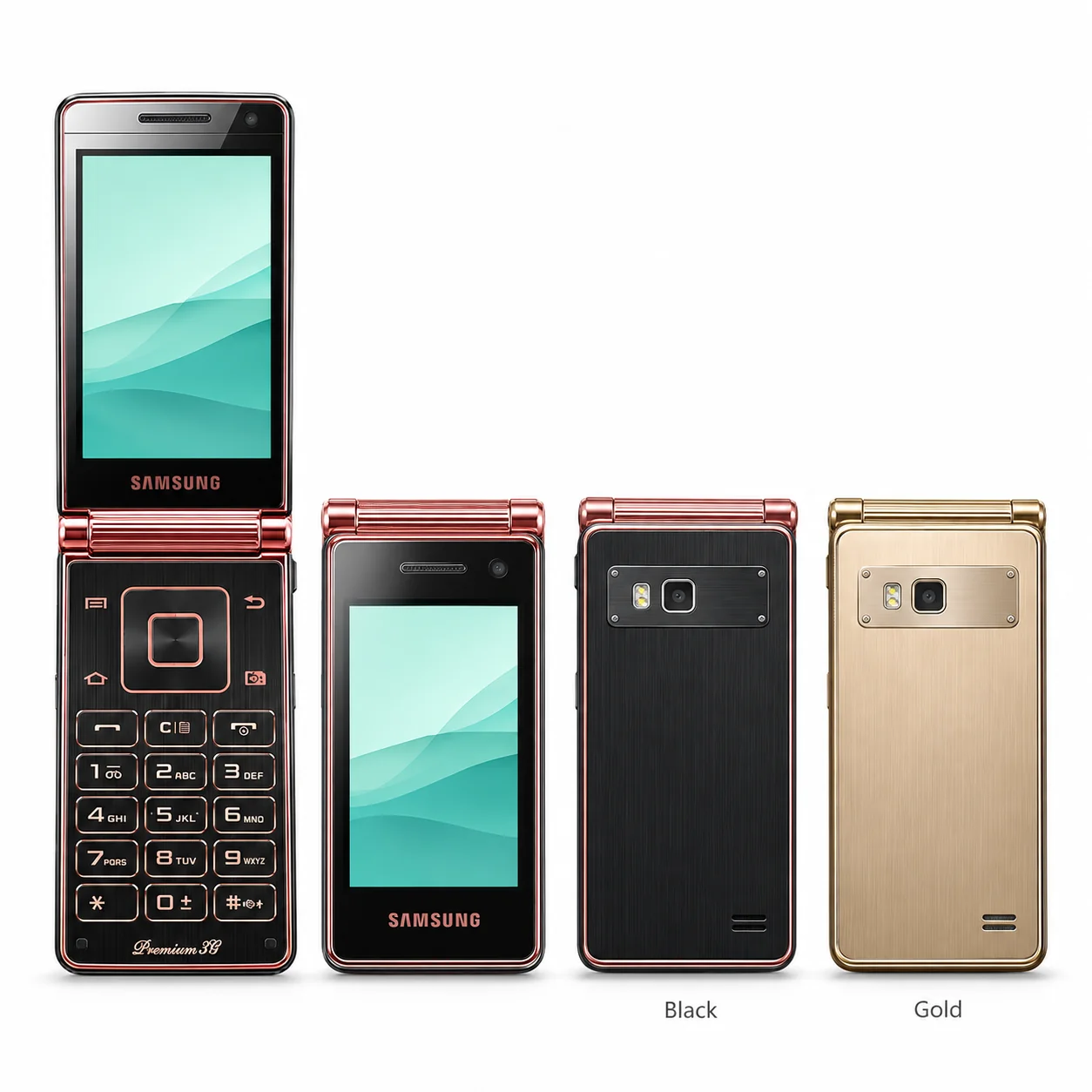
W2013 model numbers
A model number identifies the model or hardware version and is shared by many devices. Serial numbers and mobile-network identifiers such as IMEI or MEID belong to an individual device.
Where to find your model number
- Open Settings, then About phone or About device.
- Read the complete model number; the editable device name is not the hardware code.
- Compare the original box or model label if the phone cannot start.
If the phone will not turn on: Read the original packaging or printed model label. On a model with a removable battery, switch off before accessing its label; do not open a sealed rear panel.
China-market W-series model. This listing does not imply an official UK or Ireland release. Match the complete code before ordering parts.
Swipe the table sideways on a narrow screen.
| Model number | Country or region | Useful detail |
|---|---|---|
| SCH-W2013 | China-market hardware model | Match this code to the number on your phone. |
Original finish
China-market finishes verified for this model; storage and finish combinations may differ.
- Black and Gold
Verified China-market finish; English wording is a plain translation where needed.
Use the colour and the model number together. Lighting, screen settings, cases and replacement backs can change how a device looks.
Getting to know the W2013
How to recognise the W2013
W2013 has a physical keypad, two separate displays and a gold frame. Horizontal engraving across its rounded hinge is a useful visual clue; its model code begins SCH rather than the SM prefix used by later W phones.
Screens, hinge and cameras
The two rigid screens serve different positions: use the outer display with the lid closed, or open the phone to reach the inner screen and keypad. When reporting a fault, say which display, keypad or hinge is affected.
The exact regional version
The SCH-W2013 code identifies a China-market W-series handset. It should be matched before ordering a screen, case, hinge or battery; a similar-looking Galaxy model is not sufficient identification.
Specifications and what they mean
Read each specification alongside its explanation. Manufacturer test figures describe controlled conditions; age, usage and battery condition affect everyday performance.
Swipe the table sideways on a narrow screen.
| Feature | W2013 | What it means |
|---|---|---|
| Model family | SCH-W2013 | China-market hardware code; the longer sales SKU also encodes a particular finish and capacity. |
| Generation | 2012 | Model generation; this does not claim the same retail launch day in every market. |
| Finish range | Black and Gold | Verified regional finishes; names are translated into plain English where Samsung supplies only Chinese names. |
Software and service compatibility
This is a China-market model. Check the installed software version and update page on the exact handset; firmware, network bands and regional services can differ from international Galaxy phones.
Common questions about the W2013
How do I identify my Samsung W2013?
Read Settings, then About phone or About device, and look for SCH-W2013. Compare the original box or body label if the device cannot start. The longer sales code can also identify capacity and finish.
Does the W2013 have a physical keypad?
Yes. It uses a conventional hinged body, with a rigid inner screen above the numeric keypad and a separate screen on the outside. This is not a flexible-screen Galaxy Z Flip.
What colours identify the W2013?
The verified finishes are Black and Gold. These are China-market colour configurations; availability and English naming can differ from international Galaxy models. Check the model number as well as the housing.
About this guide
Device details checked 20 November 2026. Regional features, software availability and colours can vary. Pictures are visual guides; colours and small details are approximate.