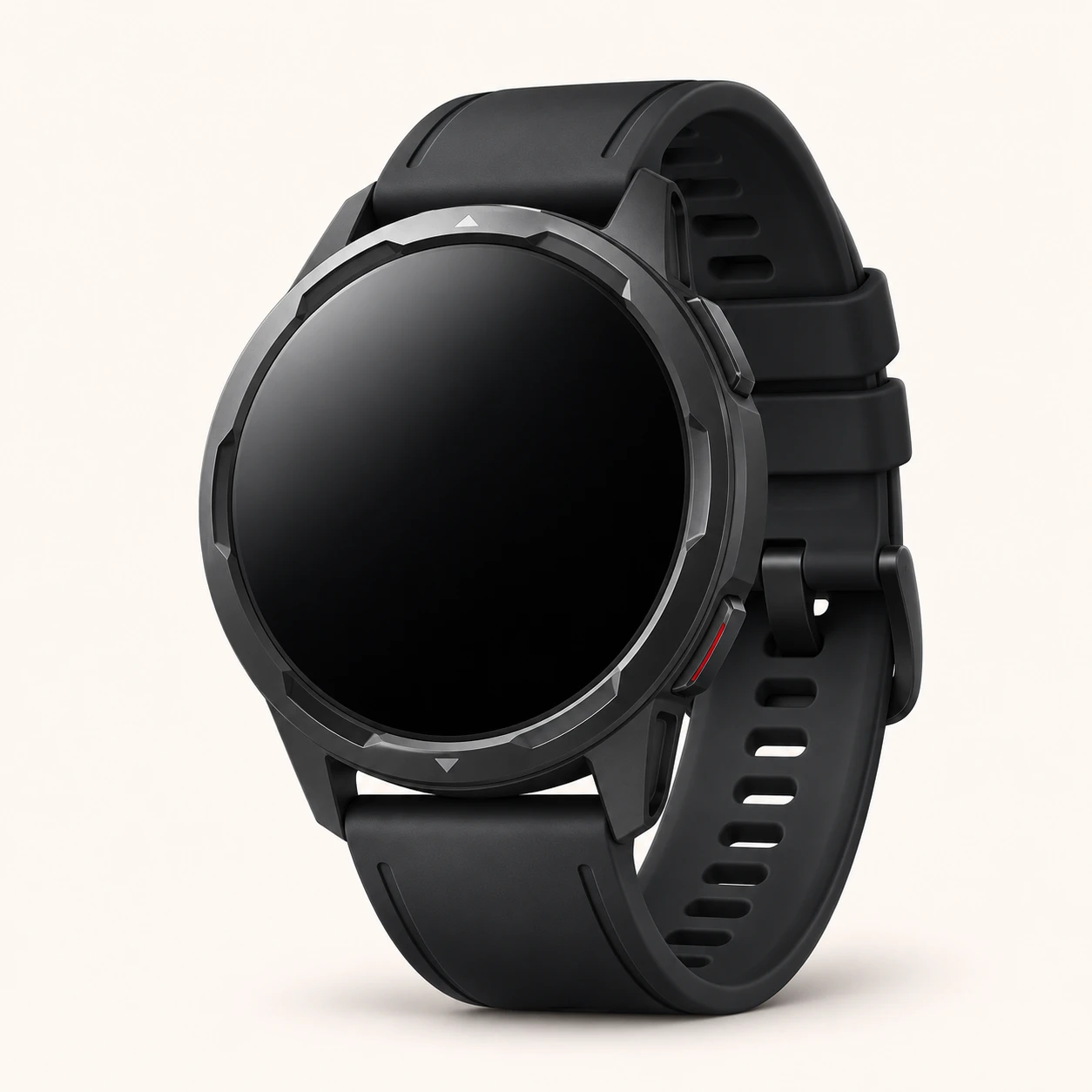
Watch S1 Active model numbers
A model number identifies the model or hardware version and is shared by many devices. Serial numbers and mobile-network identifiers such as IMEI or MEID belong to an individual device.
Where to find your model number
- On the watch, open Settings and look for About, About watch or Device information.
- Read the model and regulatory information. Record the case size and Bluetooth, Wi-Fi or cellular version where applicable.
- Compare the full marking with the original box and paired device entry in the specified companion app. Keep serial numbers and any IMEI private.
If the watch will not turn on: Check the original box, purchase record and visible rear-case markings. Record the case size and finish separately from the strap; do not open the watch to identify it.
Match the complete marking on your device, including the connectivity version and case size where applicable. A regional suffix alone does not establish UK or Irish compatibility.
Swipe the table sideways on a narrow screen.
| Model number | Case size or version | Useful detail |
|---|---|---|
| M2116W1 | Global model; UK declaration of conformity | Confirmed model marking. Match the complete code and the version on your device. |
Retail bundle numbers, storage choices, serial numbers and any IMEI differ from the shared hardware model number.
3 recorded colours
These are recorded original device finishes. A watch's replaceable strap is a separate item. Availability and colour names varied by region; swatches are approximate.
- Moon White
Original watch finish or manufacturer colour combination. Record the case finish separately from the replaceable strap.
- Space Black
Original watch finish or manufacturer colour combination. Record the case finish separately from the replaceable strap.
- Ocean Blue
Original watch finish or manufacturer colour combination. Record the case finish separately from the replaceable strap.
Use the colour and the model number together. Lighting, screen settings, cases and replacement backs can change how a device looks.
Getting to know the Watch S1 Active
Screen and case identification
Watch S1 Active uses a reinforced-polyamide frame and a magnetic contact charger. It has the same nominal screen size as Watch S1 but a different body and charging arrangement. Check the screen shape, case markings and controls together. A new strap or watch face can change its appearance without changing the model.
Charging and battery checks
Use the charging cable or dock specified for Xiaomi Watch S1 Active. Check the rear contacts or charging surface and record whether it charges with known compatible equipment. Magnetic attachment is not proof that another watch's charger is suitable.
Pairing and practical checks
The original specifications list Android 6.0 or iOS 10 and later. These published minimums are separate from the current companion app and firmware requirements. Check both before relying on pairing or a particular feature. For a repair enquiry, describe whether the fault affects the display, touch response, controls, charging or phone connection.
Specifications and what they mean
Read each specification alongside its explanation. Manufacturer test figures describe controlled conditions; age, usage and battery condition affect everyday performance.
Swipe the table sideways on a narrow screen.
| Feature | Watch S1 Active | What it means |
|---|---|---|
| Introduced | 2022 | The recorded generation year. A later purchase or software update does not create a new hardware model. |
| Screen | 1.43 in; AMOLED; 466 x 466 pixels | The diagonal measures the display, not the case. Match the complete model and screen shape when checking a replacement. |
| Dimensions | 46.5 x 47.3 x 11 mm | Physical measurements help separate similarly named models. Watch dimensions exclude the strap unless stated. |
| Weight | 36 g | Check whether a watch figure includes the strap. Covers, keyboards and other accessories add weight. |
| Body materials | Glass-fibre-reinforced polyamide frame | The outer materials help identify the version. A similar finish does not establish that two devices use the same parts. |
| Battery capacity | 470 mAh | Original nominal or typical capacity. Age, settings and signal conditions affect actual running time. |
| Charging equipment | Dedicated magnetic contact charging cable | The watch connection must match the model. Magnetic attachment alone does not prove compatibility with another watch or a phone charging pad. |
| Wi-Fi | No | Wi-Fi connects to a router. Its frequency band is separate from a tablet's 4G or 5G mobile-network capability. |
| Bluetooth | 5.2, A2DP, LE | Used for nearby accessories or phone pairing. Bluetooth calling still depends on a connected phone. |
| Mobile connection | No cellular connectivity | Confirm the exact connectivity version. Cellular service needs compatible regional hardware and an appropriate operator plan. |
| Positioning | GPS (L1+L5), GLONASS, GALILEO, BDS, QZSS | Built-in satellite positioning and a phone-assisted location are different features. Check this exact version's specification. |
| Original software platform | Proprietary OS | The software family and regional specification are separate from the version currently installed. This entry does not promise that updates remain available. |
| Phone compatibility | The original specifications list Android 6.0 or iOS 10 and later. | Published phone requirements may differ from current companion-app requirements. Check both before pairing. |
| Published resistance rating | 5ATM | Controlled testing of a new device. Wear, damage and repairs can affect sealing; this does not guarantee resistance after a repair. |
| Sensors | Accelerometer, gyro, compass, barometer, heart rate, SpO2 | Sensors support activity and general wellness features. Check the companion app and exact version for available functions. |
Software and service compatibility
The original specifications list Android 6.0 or iOS 10 and later. These published minimums are separate from the current companion app and firmware requirements. Check both before relying on pairing or a particular feature.
Common questions about the Watch S1 Active
How do I identify my Xiaomi Watch S1 Active?
On the watch, open Settings and look for About, About watch or Device information. Read the model and regulatory information. Record the case size and Bluetooth, Wi-Fi or cellular version where applicable. Match the complete code, including its letters and suffix.
Which charger should I use?
Use the original or manufacturer-specified charging cable or dock for this exact model. Match the rear charging arrangement and keep it dry before charging. Similar magnetic chargers are not automatically compatible.
Which phones can it pair with?
The original specifications list Android 6.0 or iOS 10 and later. These published minimums are separate from the current companion app and firmware requirements. Check both before relying on pairing or a particular feature.
How do I tell it from a similarly named watch?
Watch S1 Active uses a reinforced-polyamide frame and a magnetic contact charger. It has the same nominal screen size as Watch S1 but a different body and charging arrangement. Check the case and full hardware marking together, because straps and watch faces can be replaced.
What should I tell a repair shop?
Give the complete model marking, case size and connectivity version. Describe whether it powers on, charges, pairs and responds to its controls. Ask the shop to confirm the assessment, parts availability and sealing checks.
About this guide
Device details checked 21 November 2026. Regional features, software availability and colours can vary. Pictures are visual guides; colours and small details are approximate.