Nexus 5 model numbers
A model number identifies the model or hardware version and is shared by many devices. Serial numbers and mobile-network identifiers such as IMEI or MEID belong to an individual device.
Where to find your model number
- Open Settings, then About phone, and confirm that the model is Nexus 5.
- Check the original box or regulatory marking for the complete model code; D821 is the UK-listed version verified here.
- Keep Nexus 5 separate from Nexus 5X when checking parts: their screens, connectors and body designs differ.
If the phone will not turn on: Check the original box or any readable external model marking. Keep the full model code separate from the IMEI and serial number; a colour or storage size does not identify the radio variant.
D821 is verified on LG’s UK product page. Imported Nexus 5 units can have different identifiers; match the full code rather than assuming all regional units are D821.
Swipe the table sideways on a narrow screen.
| Model number | Country or region | Useful detail |
|---|---|---|
| D821 | LG UK-listed model | LG’s UK Nexus 5 product page lists D821. This is a verified regional example, not an exhaustive code list. |
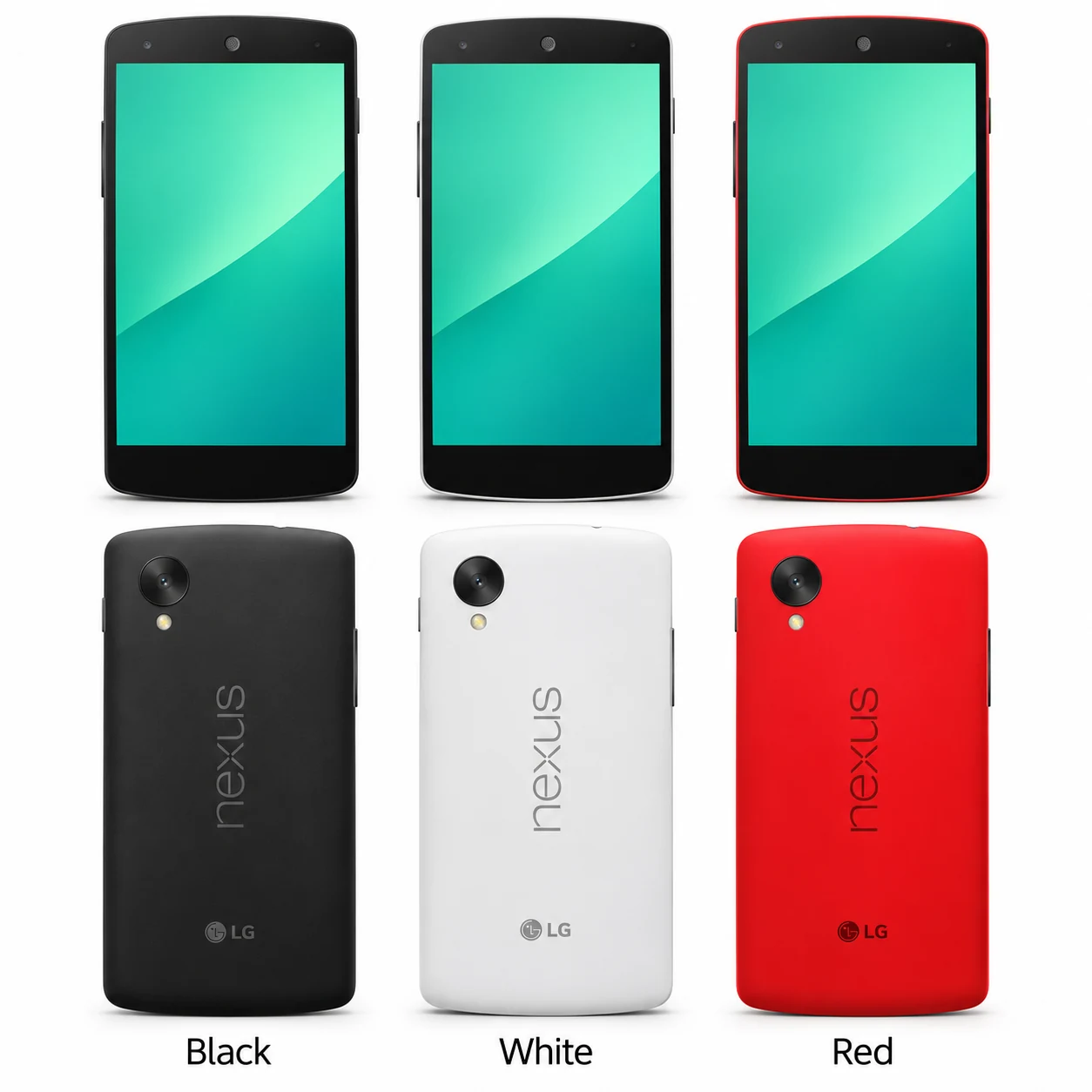
3 recorded colours
These are the original finishes recorded for this model, including documented later colours. Availability varied over time and by market.
- Black
Black rear and front; approximate swatch.
- White
White rear with black front; approximate swatch.
- Red
Bright red rear with black front; approximate swatch.
Use the colour and the model number together. Lighting, screen settings, cases and replacement backs can change how a device looks.
Getting to know the Nexus 5
A Nexus 5 is different from a Nexus 5X
The 2013 Nexus 5 has a 4.95-inch screen and Micro-USB port. Its rear camera sits towards the top-left, and it has no rear fingerprint circle. The 2015 Nexus 5X has a larger 5.2-inch screen, USB-C and a rear fingerprint sensor. Use the complete model name when arranging repair.
Camera and display checks
The rear camera has optical image stabilisation. Before and after repair, compare focus on a nearby object and a distant scene, then check the front camera separately. For screen faults, note whether the image, touch response or both are affected; a cracked cover and a failed display are different observations.
Charging through the port or the back
Nexus 5 supports wired charging through Micro-USB and built-in wireless charging. Record which route is affected if power is unreliable. Google lists 16GB and 32GB storage versions, so confirm your capacity before choosing a replacement handset or planning a backup.
Specifications and what they mean
Read each specification alongside its explanation. Manufacturer test figures describe controlled conditions; age, usage and battery condition affect everyday performance.
Swipe the table sideways on a narrow screen.
| Feature | Nexus 5 | What it means |
|---|---|---|
| Screen | 4.95-inch Full HD IPS LCD; 1920 × 1080 pixels | The display has a density of 445ppi. |
| Screen glass | Corning Gorilla Glass 3 | Check both the glass surface and touch response. |
| Processor | Snapdragon 800; 2.26GHz | This model uses a quad-core processor. |
| Graphics | Adreno 330 | The graphics processor drives games and the interface. |
| RAM | 2GB | Working memory is separate from internal storage. |
| Storage | 16GB or 32GB | Installed software reduces the space available for your files. |
| Rear camera | 8MP with optical image stabilisation | OIS helps compensate for camera movement. |
| Front camera | 1.3MP | A separate camera sits above the screen. |
| Battery | 2,300mAh; built in | Capacity describes the original battery specification. |
| Charging | Micro-USB and wireless charging | USB-C cables do not fit its Micro-USB socket. |
| Video connection | SlimPort through Micro-USB | A compatible display adapter is required. |
| Headphones | 3.5mm jack | Wired audio uses its dedicated socket. |
| Wireless | Dual-band Wi-Fi 802.11ac; Bluetooth 4.0 LE; NFC | Wireless features depend on compatible accessories and networks. |
| Mobile network | 4G LTE, 3G and 2G; regional bands vary | The complete model code matters for imported handsets. |
| Size and weight | 137.84 × 69.17 × 8.59mm; 130g | Dimensions are for the handset without a case. |
| Software at launch | Android 4.4 KitKat | A used phone may have a later installed version. |
Software and service compatibility
Google lists no guaranteed security updates for Nexus 5 after October 2016. The phone launched with Android 4.4 KitKat; check Settings for its installed version and the requirements of the apps you need.
Common questions about the Nexus 5
What model code is used by the UK Nexus 5?
LG’s UK page identifies Nexus 5 as D821. Use the complete marking on your phone or its original packaging when checking compatibility.
Is Nexus 5 the same as Nexus 5X?
No. Nexus 5 is the 2013 model with a 4.95-inch screen and Micro-USB. Nexus 5X is the 2015 model with a 5.2-inch screen, USB-C and rear fingerprint reader.
What colours were available for Nexus 5?
LG lists Black, White and Red. The front remains dark on the White and Red versions.
Can Nexus 5 charge wirelessly?
Yes. Google lists built-in wireless charging, alongside its Micro-USB connection.
About this guide
Device details checked 21 November 2026. Regional features, software availability and colours can vary. Pictures are visual guides; colours and small details are approximate.