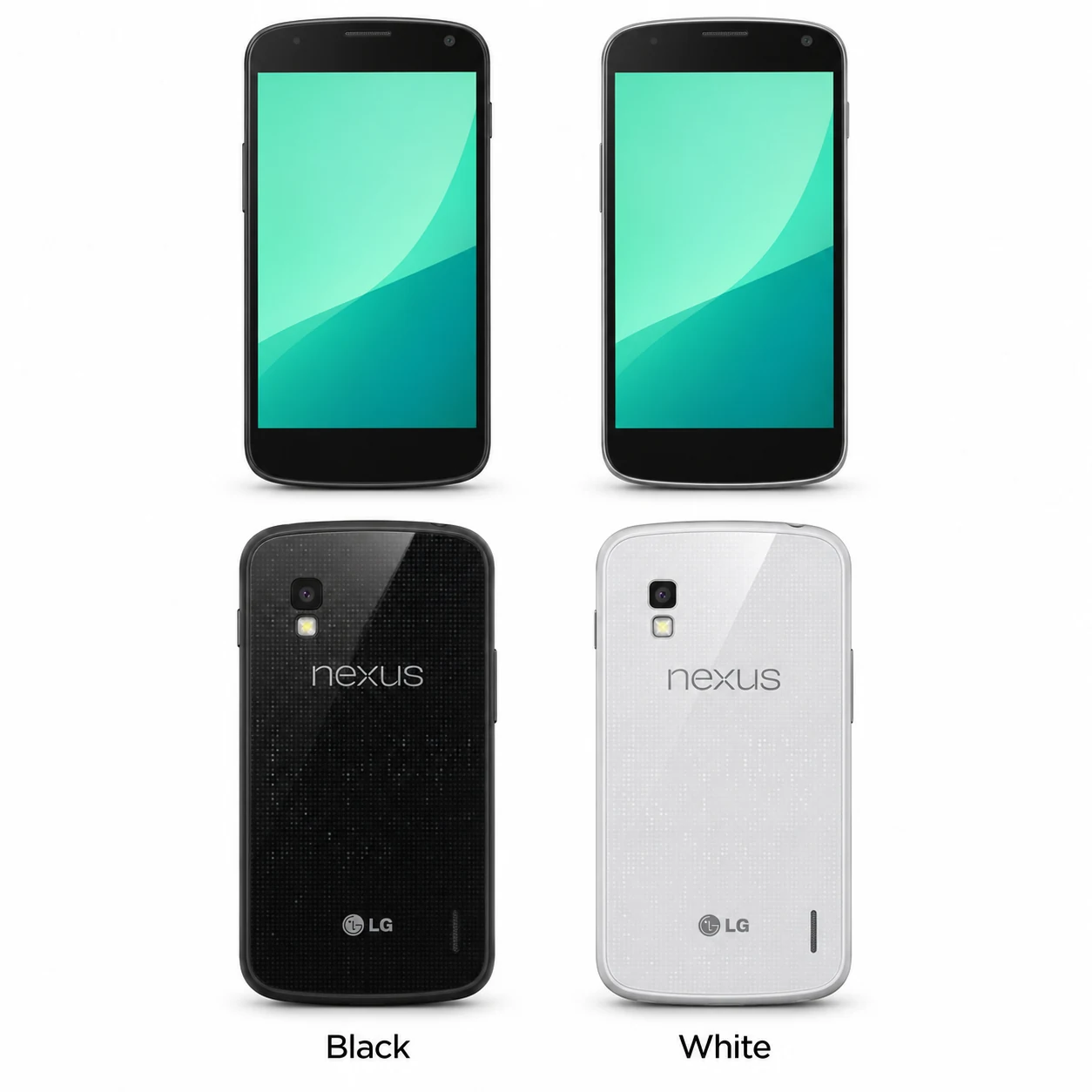
Nexus 4 model numbers
A model number identifies the model or hardware version and is shared by many devices. Serial numbers and mobile-network identifiers such as IMEI or MEID belong to an individual device.
Where to find your model number
- Open Settings, then About phone, to confirm the model and installed Android version.
- Check the original packaging or readable regulatory marking for E960, preserving any LG prefix or regional suffix.
- Confirm the storage capacity separately; the Black and White finishes belong to the same Nexus 4 generation.
If the phone will not turn on: Check the original box or any readable external model marking. Keep the full model code separate from the IMEI and serial number; a colour or storage size does not identify the radio variant.
E960 is verified on LG’s UK product page. This code list does not imply that every imported device or sales suffix is covered.
Swipe the table sideways on a narrow screen.
| Model number | Country or region | Useful detail |
|---|---|---|
| E960 | LG UK-listed model | LG’s UK Nexus 4 product page identifies this handset as E960; keep any LG prefix or suffix shown on your device. |
2 recorded colours
These are the original finishes recorded for this model, including documented later colours. Availability varied over time and by market.
- Black
Dark rear with reflective dotted detail and black front; approximate swatch.
- White
White rear, black front; introduced in 2013; approximate swatch.
Use the colour and the model number together. Lighting, screen settings, cases and replacement backs can change how a device looks.
Getting to know the Nexus 4
The glass rear is part of its identity
Nexus 4 has a black front, rounded corners and a glass rear with a reflective dotted pattern. The White edition arrived in 2013 but kept the black front. Record whether damage affects the front, rear or both when requesting a repair.
Two charging methods to check
Micro-USB provides wired charging and data, and the phone also supports wireless charging. If charging is intermittent, describe which method fails and whether a different compatible cable or charger changes the result. That observation helps a shop narrow the problem without assuming a battery or port fault.
Identify capacity and network needs
Nexus 4 was sold with 8GB or 16GB of storage and uses GSM/UMTS/HSPA+ mobile networks. Check the exact E960 marking and the capacity shown in Settings when comparing used devices. Ask your network about current service compatibility for the particular handset.
Specifications and what they mean
Read each specification alongside its explanation. Manufacturer test figures describe controlled conditions; age, usage and battery condition affect everyday performance.
Swipe the table sideways on a narrow screen.
| Feature | Nexus 4 | What it means |
|---|---|---|
| Screen | 4.7-inch IPS LCD; 1280 × 768 pixels | A 320ppi display with a 5:3 shape. |
| Screen glass | Corning Gorilla Glass 2 | The front cover glass can be damaged separately from the displayed image. |
| Processor | Snapdragon S4 Pro; 1.5GHz | LG identifies the chipset as Qualcomm APQ8064. |
| Graphics | Adreno 320 | The graphics processor works alongside the main CPU. |
| RAM | 2GB | Working memory for the system and applications. |
| Storage | 8GB or 16GB | Available file space is less after software and formatting. |
| Rear camera | 8MP | One rear camera with flash. |
| Front camera | 1.3MP | Used for self-portraits and supported video calls. |
| Battery | 2,100mAh; built in | The battery is not designed for removal through a user-accessible cover. |
| Charging | Micro-USB and wireless charging | Wired and wireless charging can be checked separately. |
| Video connection | SlimPort through Micro-USB | External display use requires a compatible adapter. |
| Headphones | 3.5mm jack | A dedicated socket supports wired audio. |
| Wireless | Wi-Fi 802.11a/b/g/n; Bluetooth; NFC | Wi-Fi and mobile network connectivity are separate functions. |
| Mobile network | GSM/UMTS/HSPA+ | Check current carrier compatibility for the device. |
| Size and weight | 133.9 × 68.7 × 9.1mm; approximately 139g | Google’s dimensions and rounded weight are shown. |
| Software at launch | Android 4.2 Jelly Bean | Launch software does not establish the installed version. |
Software and service compatibility
Google lists no guaranteed security updates for Nexus 4 after November 2015. Its launch software was Android 4.2 Jelly Bean; check the version currently installed in Settings before assessing app compatibility.
Common questions about the Nexus 4
What is the Nexus 4 model number?
LG’s UK Nexus 4 page lists E960. Match the full label on the phone or box, including any LG prefix or sales suffix.
Was Nexus 4 available in White?
Yes. LG announced a White Nexus 4 in May 2013. It is a colour edition of the Nexus 4, with a black front, rather than a new Nexus generation.
Does Nexus 4 support wireless charging?
Yes. Google lists wireless charging support. The Micro-USB port remains available for wired charging and data.
How much storage does Nexus 4 have?
Nexus 4 was offered with 8GB or 16GB of built-in storage and 2GB of RAM. Check the capacity on the individual phone; RAM and file storage are different.
About this guide
Device details checked 21 November 2026. Regional features, software availability and colours can vary. Pictures are visual guides; colours and small details are approximate.