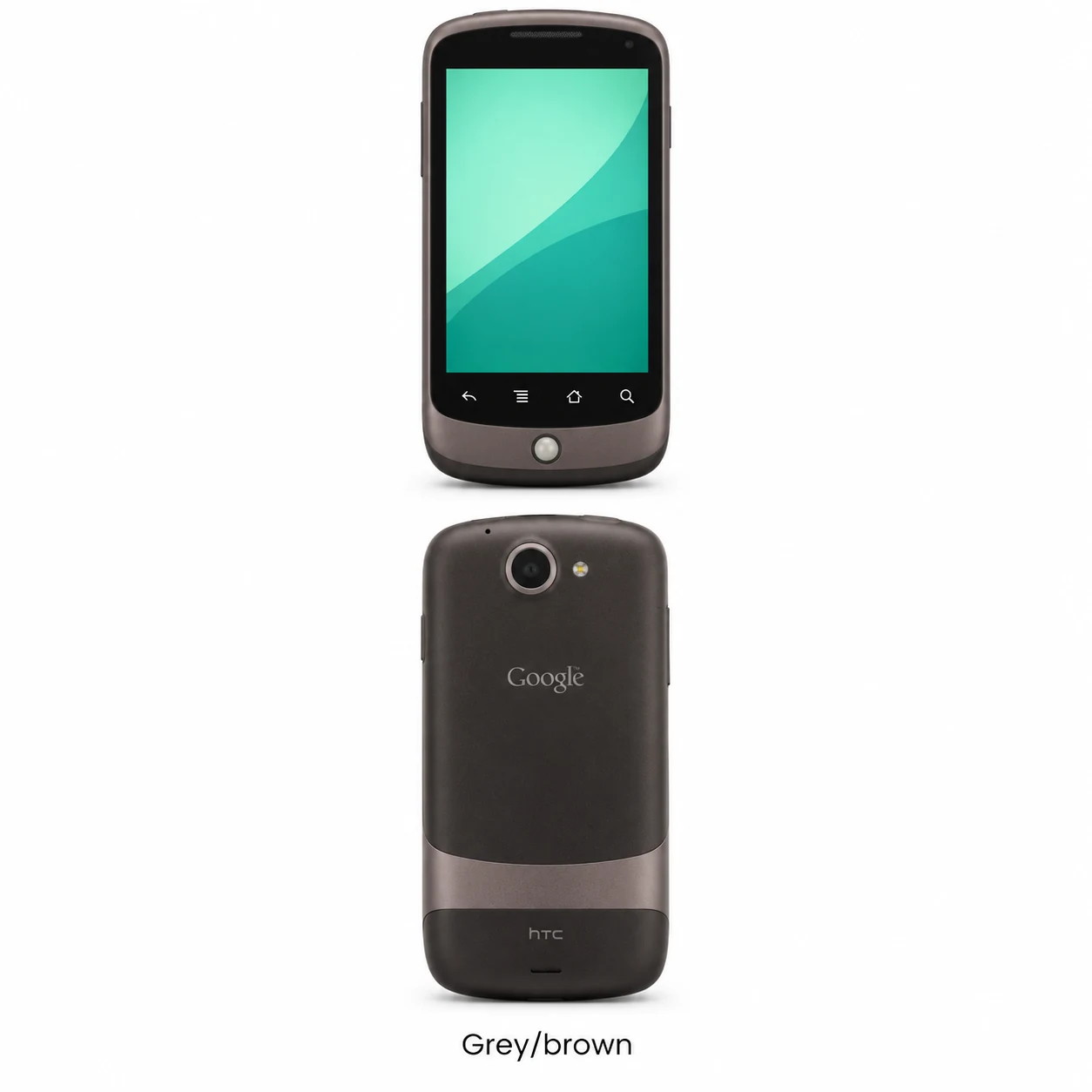
Nexus One model numbers
A model number identifies the model or hardware version and is shared by many devices. Serial numbers and mobile-network identifiers such as IMEI or MEID belong to an individual device.
Where to find your model number
- If the phone turns on, open Settings and About phone to confirm the Nexus One name and installed Android version.
- Compare the original packaging or regulatory information with the complete hardware code; PB99100 is one verified HTC identifier.
- The trackball, four touch-sensitive navigation buttons and removable back help identify the design. Confirm the display version separately before ordering a screen.
If the phone will not turn on: Check the original box or any readable external model marking. Keep the full model code separate from the IMEI and serial number; a colour or storage size does not identify the radio variant.
PB99100 is verified in an HTC-authored regulatory label document. No country mapping or exhaustive list of radio variants is claimed.
Swipe the table sideways on a narrow screen.
| Model number | Country or region | Useful detail |
|---|---|---|
| PB99100 | Verified HTC hardware code | HTC regulatory filing identifies PB99100. This is a verified example, not a complete list of all regional Nexus One versions. |
Original finish
The grey/brown swatch describes the original exterior; an official Google marketing colour name has not been verified.
- Grey/brown
Descriptive two-tone finish, not a verified official marketing colour name; approximate swatch.
Use the colour and the model number together. Lighting, screen settings, cases and replacement backs can change how a device looks.
Getting to know the Nexus One
Recognising the first Nexus phone
The small round trackball sits below four navigation controls. A removable rear cover gives access to the battery and cards. The single rear camera has an LED flash; this model has no front camera for video calls.
Check the screen version before repair
Google’s 2010 owner’s guide describes an AMOLED display. HTC later announced Super LCD for the global Nexus One. Record the screen fitted to the individual handset before choosing a replacement; the Nexus One name alone does not settle the panel type.
Storage is split between the phone and its card
The phone has 512MB of built-in flash storage and a separate microSD slot. A 4GB card was supplied, with support for cards up to 32GB. If files appear to be missing, establish whether they were saved to the handset or the removable card before any reset.
Describe each control separately
For a useful repair enquiry, say whether the touchscreen, trackball, navigation controls or power button is failing. These are separate inputs. If the phone starts, save the files you need and record its current behaviour before handing it over.
Specifications and what they mean
Read each specification alongside its explanation. Manufacturer test figures describe controlled conditions; age, usage and battery condition affect everyday performance.
Swipe the table sideways on a narrow screen.
| Feature | Nexus One | What it means |
|---|---|---|
| Screen | 3.7-inch; 800 × 480 pixels | AMOLED in the original guide; HTC later introduced Super LCD units. |
| Processor | Qualcomm QSD8250; 1GHz | The original Snapdragon platform used in this model. |
| RAM | 512MB | Working memory is separate from file storage. |
| Built-in storage | 512MB flash | The operating system occupies part of this capacity. |
| Memory card | microSD; 4GB supplied; up to 32GB supported | A removable card can hold media and files. |
| Rear camera | 5MP autofocus with LED flash | There is one rear camera. |
| Front camera | None | The front contains sensors and the earpiece, not a selfie camera. |
| Battery | 1,400mAh; removable | The battery can be accessed behind the removable cover. |
| Charging and data | Micro-USB | This predates USB-C. |
| Headphones | 3.5mm headset jack | Wired headphones use the top-edge socket. |
| Wireless | Wi-Fi 802.11b/g; Bluetooth 2.1 + EDR | Specifications from Google’s original owner’s guide. |
| Mobile network | GSM/EDGE and 3G UMTS | Supported 3G bands differ between regional versions. |
| Controls | Clickable trackball and four illuminated navigation controls | These controls are separate from the touchscreen. |
| Size and weight | 119 × 59.8 × 11.5mm; 130g with battery | Weight without the battery is 100g. |
| Software at launch | Android 2.1 Eclair | The installed version can differ on a used handset. |
Software and service compatibility
Nexus One launched with Android 2.1 in 2010. It is a legacy Android device: check the installed software and the requirements of the apps or services you intend to use. Google’s current Nexus support-period table does not give a Nexus One end date.
Common questions about the Nexus One
Is Nexus One the same phone as the first Google Pixel?
No. Nexus One is the HTC-built Nexus phone released in 2010. The Nexus One has a trackball and removable battery; use its own model identifier when arranging repair.
Does Nexus One use AMOLED or LCD?
The original Google manual specifies AMOLED. HTC subsequently announced Super LCD versions. Match the actual panel version in the handset before selecting a replacement display.
Can I replace the Nexus One battery?
The original battery is removable through the rear cover. Match the replacement to the handset and battery markings; the original rated capacity is 1,400mAh.
What is the Nexus One model code?
PB99100 is one verified HTC hardware code. The FCC identifier NM8PB99100 includes the same code. Check the complete marking or original box because this guide does not list every regional version.
About this guide
Device details checked 21 November 2026. Regional features, software availability and colours can vary. Pictures are visual guides; colours and small details are approximate.