Pixel Tablet model numbers
A model number identifies the model or hardware version and is shared by many devices. Serial numbers and mobile-network identifiers such as IMEI or MEID belong to an individual device.
Where to find your model number
- Open Settings, then About tablet.
- Open Regulatory labels and find the tablet model GTU8P.
- Use the tablet code when checking parts; the separate dock has its own GMD6J code.
If the tablet will not turn on: Check the original packaging and the tablet’s external label under good lighting. Keep the serial number separate from the model identifier.
Verified hardware identifiers listed below. Storage and colour are separate choices; match the complete marking on your tablet.
Swipe the table sideways on a narrow screen.
| Model number | Version or region | Useful detail |
|---|---|---|
| GTU8P | Wi-Fi tablet | Google Pixel Tablet. The separate Charging Speaker Dock is GMD6J. |
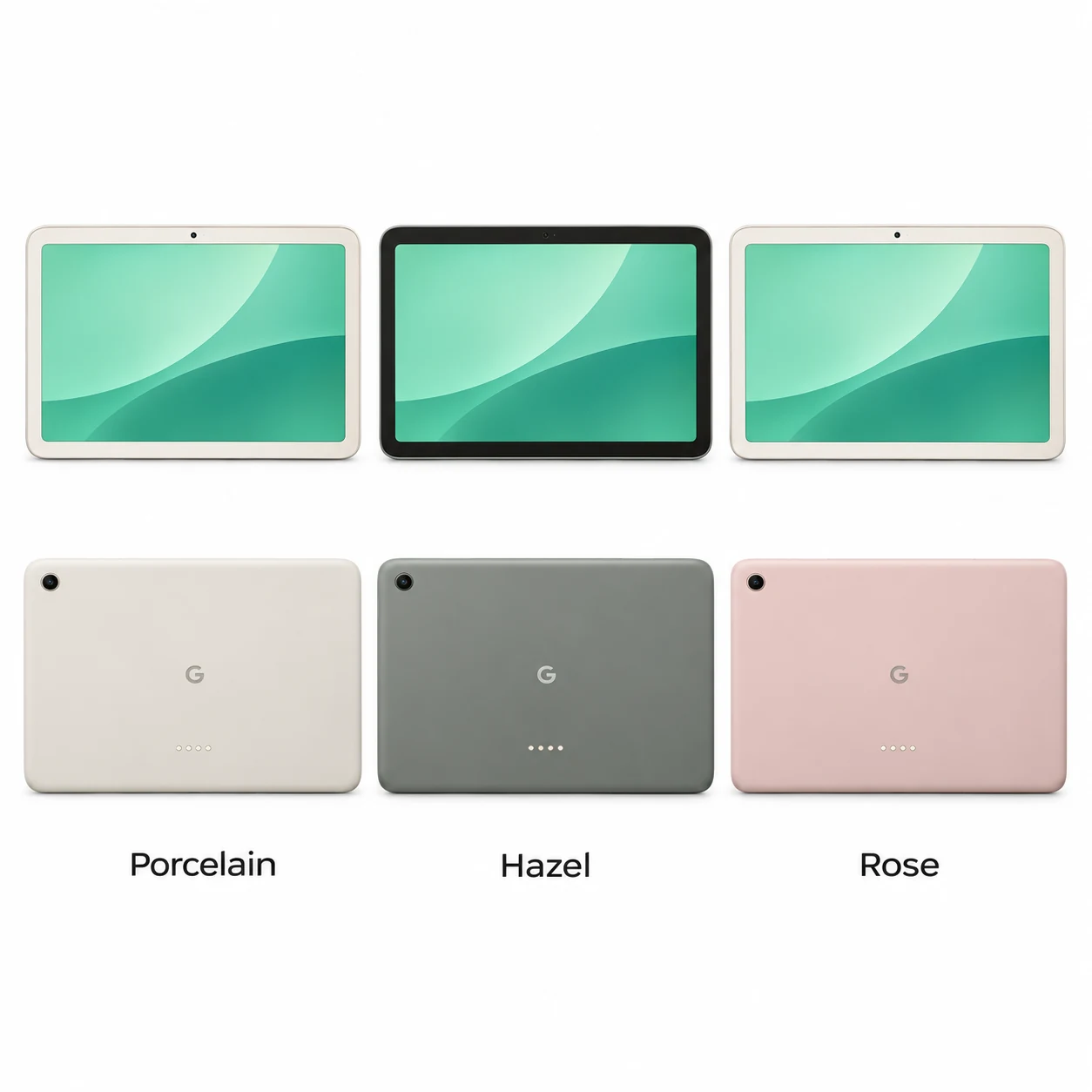
3 recorded colours
These are the original finishes recorded for this model, including documented later colours. Availability varied over time and by market.
- Porcelain
Light front bezel; approximate swatch.
- Hazel
Dark front bezel; approximate swatch.
- Rose
US-only finish with light front bezel; approximate swatch.
Use the colour and the model number together. Lighting, screen settings, cases and replacement backs can change how a device looks.
Getting to know the Pixel Tablet
A tablet for your hands and your home
The 10.95-inch LCD uses a 16:10 shape suited to films, browsing and split-screen apps. Four built-in speakers work when the tablet is away from its dock. The landscape front camera is positioned for video calls with the tablet held horizontally.
The dock is a separate part of the setup
The optional Charging Speaker Dock connects through four contacts on the back. It adds a speaker and keeps the tablet charged. Hub Mode works when the tablet is locked and docked. A tablet sold without the dock is the same Pixel Tablet generation, so the bundle does not need a different device guide.
Useful checks before and after a repair
Record whether the fault happens on USB-C power, on the dock or in both situations. During an agreed pre-repair check, test the touchscreen, speakers, cameras and power-button fingerprint reader. Repeat the same checks after the work; this makes the change in behaviour clear for the customer and the shop.
Specifications and what they mean
Read each specification alongside its explanation. Manufacturer test figures describe controlled conditions; age, usage and battery condition affect everyday performance.
Swipe the table sideways on a narrow screen.
| Feature | Pixel Tablet | What it means |
|---|---|---|
| Screen | 10.95-inch LCD; 2560 × 1600 pixels | The 16:10 display is marketed as an 11-inch screen. |
| Processor | Google Tensor G2; Titan M2 security chip | Tensor runs applications; Titan M2 supports device security. |
| Memory and storage | 8GB RAM; 128GB or 256GB storage | Working memory and file capacity serve different purposes. |
| Cameras | 8MP front; 8MP rear | Both cameras have fixed focus. |
| Charging | USB-C or Charging Speaker Dock | The dock attaches to the rear contacts; it is optional. |
| Wired connection | USB-C 3.2 Gen 1; four-pin dock connector | The two connections are physically different. |
| Battery | 27 watt-hours | This describes stored energy rather than a guaranteed daily runtime. |
| Wireless | Wi-Fi 6; Bluetooth 5.2 | Internet access uses Wi-Fi or a phone’s hotspot. |
| Mobile data and storage cards | No SIM or SD-card support | Choose the built-in capacity you need. |
| Unlocking and stylus | Power-button fingerprint sensor; USI 2.0 stylus support | Use a compatible pen; it is a separate accessory. |
| Size and weight | 258 × 169 × 8.1 mm; 493 g | Measurements are for the tablet without its dock. |
Software and service compatibility
Google lists OS and security updates for Pixel Tablet through June 2028, checked on 21 November 2026. Open Settings, then System and Software updates to check the updates available for your tablet.
Common questions about the Pixel Tablet
What is the Pixel Tablet model number?
Google identifies the Pixel Tablet as GTU8P. GMD6J identifies its Charging Speaker Dock, so do not use the dock code to order tablet parts.
Can Pixel Tablet charge without its dock?
Yes. Connect the tablet’s USB-C port to a compatible USB-C power adapter. The tablet and dock can be bought separately.
Does Pixel Tablet take a SIM card?
No. Pixel Tablet uses Wi-Fi and has no cellular version. A compatible phone hotspot can provide internet access away from home.
Which colours were available for Pixel Tablet?
Porcelain and Hazel were the standard international finishes. Google lists Rose as a US-only colour.
About this guide
Device details checked 21 November 2026. Regional features, software availability and colours can vary. Pictures are visual guides; colours and small details are approximate.